Warning: Constant FS_CHMOD_DIR already defined in /home/umwdtltc/public_html/wp-config.php on line 101

Warning: Constant FS_CHMOD_FILE already defined in /home/umwdtltc/public_html/wp-config.php on line 101

Warning: Cannot modify header information - headers already sent by (output started at /home/umwdtltc/public_html/wp-config.php:101) in /home/umwdtltc/public_html/wp-includes/feed-rss2.php on line 8
Open Education – UMW Division of Teaching and Learning Technologies https://umwdtlt.com Mon, 30 Apr 2018 19:31:28 +0000 en hourly 1 https://wordpress.org/?v=7.1.5 https://i0.wp.com/umwdtlt.com/wp-content/uploads/2017/11/cropped-dtlt-black1.png?fit=32%2C32&ssl=1 Open Education – UMW Division of Teaching and Learning Technologies https://umwdtlt.com 32 32 103540615 Introducing Digital Collections: An Access and Preservation Platform https://umwdtlt.com/introducing-digital-collections-an-access-and-preservation-platform/ Mon, 30 Apr 2018 10:00:13 +0000 http://umwdtlt.com/?p=57694 This is cross-posted from The Spinning Wheel blog, maintained by UMW Libraries Special Collections and University Archives.

In celebration of Preservation Week, UMW Libraries is excited to announce the release of a new digital preservation and access platform, Special Collections and University Archives: Digital Collections, powered by Preservica. Simpson Library has been providing access to its unique digitized collections for ten years, and this new platform takes our digital preservation initiatives to a higher level, as well as provides the user community with more materials for research. Many of our readers may be familiar with Archives@UMW, our previous platform, and we hope that you will find just as much use and enjoyment from our new system as we move forward with our digital preservation technology and goals.

A screen capture of the home page of the Digital Collections system. It shows an introductory paragraph and five collections.
The home page of the new Digital Collections system.

As more and more formats are created and used by our University community, library staff must develop strategies to select, acquire, preserve, and provide access to these unique resources. While we will always archive traditional, analog formats, many of our campus community members submit papers as PDFs rather than printed pages, and create class projects on blogs and YouTube rather than poster board. In addition to viewing our fantastic physical materials, we know that future researchers will also want to take a look at those PDFs, videos, and websites. A large part of our mission at Special Collections and University Archives is to collect the institution’s history, and much of that today is digital.

While storing multiple copies of digital resources is always a good start, we also want to make sure we are pursuing active digital preservation. That is, we need to constantly be able to assess the usability of our digital files, making sure they are formatted for consumption (i.e. could you still open an electronic file you created in the early 90’s with today’s software?). If not, we must migrate those files to new, sustainable derivatives. It’s important to confirm that none of the records we are acquiring have viruses or other issues, and that none of the data deteriorates or “rots” over time. Perhaps most importantly, though, we must be able to provide access to the materials we are archiving. Our new platform will help us effectively manage all of these tasks.

We have lots of goals, ideas, and imaginings for Digital Collections. This summer, in collaboration with the Division of Teaching and Learning Technologies, we plan to start an archival appraisal and acquisition project of the many UMW blogs created over the years. We will also proactively collect current projects created on Domain of One’s Own as we work with community members to decide what should and can be preserved. We plan to continue digitizing our unique materials, such as scrapbooks and ledgers, as well as our audiovisual materials, expanding current collections and creating new ones.

A screen capture of the Trinkle Hall Blueprint collection, showing website features such as facets and a search box.
Trinkle Library, a part of the UMW Blueprints and Architectural Drawings Collection, incorporates facets to assist with narrowing down browse and/or search results.

As access is a top priority for us at Simpson Library, we hope that you will take a moment to browse our new website. With the exception of undergraduate honors projects and graduate Education projects, which have been migrated into Eagle Scholar, all of our digital archival collections are available to search and browse through Special Collections and University Archives: Digital Collections. University Publications are still searchable through our custom interface, Eagle Explorer. Archives@UMW will be available through the summer, but we will have all links pointing to our new platform by the start of the fall semester. As you are viewing the new system, please send us any suggestions or feedback you may have. We are always appreciative of your ideas for improving access and usage of our collections!

]]>
57694
Sharing for our Community: UMW Assignment Bank https://umwdtlt.com/sharing-for-our-community-umw-assignment-bank/ Wed, 18 Apr 2018 16:25:41 +0000 http://umwdtlt.com/?p=57679 Today we welcome guest blogger Peter Catlin. Peter is a reference librarian at UMW’s Simpson Library, and he also serves as the library’s coordinator of first-year programs.

Hello blog readers! I’m here today on behalf of the UMW Libraries to tell you about a new service we’re launching, called the UMW Assignment Bank.

“What is an assignment bank?”, I hear you ask. “Why do we need one?”

I will answer these questions at the end of this post, but first, I want to give you some background. I want to talk about the purpose of libraries, and about the way information flows through them.

The purpose of a library is to serve its community, but “serving” is a broad concept. A library can serve its community in a wide variety of ways. For example, a library provides its community with information about the world, and it also gives them resources for fact-checking the claims they read online, and it also helps them get their hands on the latest John Green novel.

Notice that, in all of these examples, information is flowing into the community from outside the community. The information is created elsewhere. The librarians look outside the community, identify the best information, and then make it available to their community, by buying books or by subscribing to electronic databases.

There’s nothing wrong with this model, but I think most librarians would agree that this model isn’t enough. There’s more to “serving the community” than just moving information inward. Librarians recognize that the people in our communities aren’t just consumers of information, they’re also creators of information. A good library should preserve the information created by its community, curate this information, and give the creators a way to share their creations.

This is not a new idea. Many libraries have collections of local works. Here at the UMW Libraries, we have Special Collections and University Archives, which preserves and provides access to items from more than a century of Mary Washington history. We also recently launched Eagle Scholar, an online repository for works created by members of the UMW community.

With all this in mind, let’s revisit the Assignment Bank.

In my job, I see a lot of class assignments. I’m an instruction librarian, which means that professors invite me to meet with their classes and help their students learn how to do research. When a professor asks me to meet with their class, I request a copy of the assignment that the students will be working on, so that I can tailor my presentation to the students’ needs. As a result of this, there’s a folder on my computer that contains assignments from dozens of different courses. I rely on this information to do my job.

One day, a thought occurred to me: If this information helps me, maybe it could help other people, too. Maybe professors would benefit from seeing what their colleagues are doing. Maybe, as a librarian, I have a duty to preserve and provide access to this information.

This was the genesis of the Assignment Bank. I knew that UMW professors have designed some brilliant assignments for their classes. I knew that if other professors saw these assignments, they would be inspired. So, all that the librarians would have to do would be to create a website to make it easy for professors to share assignments with each other. Easy, right?

Well, easy for me to say. I don’t have a background in web design. I shared my idea with several of my colleagues, who patiently explained to me that what I was proposing was more difficult than I realized — and then told me that they would help me create it anyway.

And they did!

The Assignment Bank is now up and running. Take a look! You can browse the assignments that have been contributed, or contribute your own assignment.

I could not have created the Assignment Bank by myself. The fact that it exists today is a testimony to the skills of my colleagues. I particularly want to thank Rosemary Arneson, our University Librarian; Katherine Perdue, our Web Services Librarian; Angie White, our Digital Resources Librarian, and Carolyn Parsons, the Head of Special Collections and University Archives. I’d also like to thank DTLT for inviting me to be a guest blogger. Thank you, everyone! I feel privileged to be part of the UMW community with you.

Photo by Dawn Armfield on Unsplash

]]>
57679
Building Complexity https://umwdtlt.com/building-complexity/ Thu, 16 Feb 2017 15:38:22 +0000 http://umwdtlt.com/?p=53985

The excitement here is in building complexity, not reducing it

I, as an educator and a serviceable technologist, have long admired Mike Caulfield’s thoughtful and important work. I have followed him for a long time on Twitter, and had the pleasure of finally meeting him at a conference at Stanford a few years ago. He was experimenting with a concept called the Federated Wiki, but what I was most inspired by was is idea of “building complexity, not reducing it.”

In his talk, The Garden and The Stream, Caulfield compares the way the web was (or envisioned as being) versus the stream, which is what it has become. The metaphors were powerful for me then and remain powerful for me now in understanding what we want the web (and I would argue, education) to be. The garden can provide an opportunity to plant, to cultivate, to grow, to flourish:

More than that, there’s a substance to the vision that you can’t help but long for reading it. Note that connections here aren’t banter, but the construction of a mental model of a subject area. And that model can be taken by someone else and extended, built on. Humanity can advance, not through argument by through a true collaboration.

But then along came what he calls the stream, where the experience became much more set in a path, following the boundaries:

The “conversational web”. A web obsessed with arguing points. A web seen as a tool for self-expression rather than a tool for thought. A web where you weld information and data into your arguments so that it can never be repurposed against you. The web not as a reconfigurable model of understanding but of sealed shut presentations.

The stream, for Caulfield, reduces complexity, where, as I cited above, he wants to build complexity, build the moments of thought and reflection and cognition.

This ethos has permeated all of Caulfield’s projects, but he was galvanized after the recent election to tackle “fake news” and digital polarization through platforms such as facebook. His personal blog has become an invaluable resources for educators looking for not only resources and thoughtful discussions on fake news, digital polarization, and digital literacy but a handy how-to site to help students work through the process, like with his viral photo-checking challenges.

Most impressive has been his ability to build, in a month, The Digital Polarization Initiative, which invites students to practice various forms of digital literacies in the service of figuring out the levels of veracity for certain claims made online, in the media and elsewhere. A number of Digital Studies classes this semester will be part of the pilot group of participants.

To compliment the Digital Polarization Initiative work, Caulfield has also written an OER textbook called Web Literacy for Student Fact-Checkers. It’s a invaluable resource for students and faculty, allowing flexible implementation of these kinds of activities across disciplines.

The opportunity to have Caulfield here on campus to talk to the students and faculty about these issues in a tremendous opportunity to help all of our thinking and teaching and learning about digital fluency, digital polarization, and how we all need to slow down online. In his most recent post, Narrative Neediness, Caulfield cautions our need to create simple narratives, particularly in the face of often complex data points. For him, it all comes down to moments in our pedagogy where we slow down:

That moment when the facts slot into a narrative eventually comes for everyone. It has to; we’re human and what we want is meaning. But I’m  interested in delaying its arrival, if only for a little bit. And the question I have is how we can orient our pedagogy and digital interfaces to increase that delay, and in the process construct some narratives that are a bit less tidy and a bit more useful.

We hope you’ll join us on March 15th at 4pm in the HCC Digital Auditorium to do just this: delay and construct some less tidy but more useful narratives.

Image by Matthew Henry licensed CC-0

]]>
53985
Copyright for Instructors https://umwdtlt.com/copyright-for-instructors/ Tue, 22 Nov 2016 18:12:17 +0000 http://umwdtlt.com/?p=53476 Navigating copyright for class materials can be difficult, especially where digital media is concerned. While many educational uses of digital media constitute fair use, fair use law is complicated, and media producers (especially film) often do things to prevent piracy that also make it difficult-to-impossible for us to exercise our fair-use rights.

That said, there are some things that are clearly allowed within an educational context, and some helpful online resources for navigating the grayer areas.

Following is a summary of basic guiding principles for legally using digital media in educational settings. Note that I am not a lawyer. However, I am both a teacher and a creative professional (musician, editor, coder, web designer), and have read and thought about these issues a lot. Hopefully what follows will be of help to you.

Overview

The University of Texas has an excellent crash course on copyright, which describes the basic legal rights of content creators.

The Copyright Act gives all authors a set of rights that only they may exercise. These include the right to make copies, to prepare derivative works, to publicly distribute, display and perform the work, and in the case of digital sound recordings, to perform the works over a digital network.

With this short set of rights, you would have near perfect control over your works, in fact, too perfect a control over your works. So, the law provides some breathing room so that the public can benefit from the increased numbers of works, which after all is the goal of the law. To use those works, the public enjoys rights to display their own copies, to lend them or give them away, even to sell them, and to reproduce parts of the works in certain circumstances, even to reproduce the entire work in some cases, as a fair use. For more information about fair use, read Fair use of copyrighted materials.

A creator’s rights persist for their entire lifetime, plus 70 more years. After that, works become part of the public domain, and anyone can use them for any purpose, without attribution or paying royalties. (Note that new republications of public domain works are still public domain, but new critical editions that contain original scholarship alongside, even inside, the original content are copyrighted.)

And it is worth noting that these rights belong to an author whether or not they claim them or include a copyright notice on their work. That wasn’t always the case, but under current law, any fixed created work is copyrighted. (Not every type of work is copyrightable, though. See this page for more info.)

Fair use

While there are a few well defined use cases in which the use of copyrighted material is definitely legal or definitely illegal in the US, there is a large gulf of practices that fall somewhere in between. In those cases, the definitive ruling of legal/illegal comes only when the copyright holder sues the party using the material and a judge rules on it. That’s incredibly unhelpful for those of us making use of copyrighted materials in our own work, but this flexibility is there in order to allow for informed reason to prevail in situations that could not be anticipated in detail by lawmakers.

Generally, courts take the following four parameters in mind when deciding if a use of copyrighted material is illegal or fair use:

  • Purpose – Is the purpose academic, commercial, personal, religious, accessibility? No purpose wholly exonerates or implicates, but it does tip the balance along with the other three parameters.
  • Nature – What is the nature of the work that incorporates copyrighted material ― published, unpublished, fiction, non-fiction, artistic, educationally important, a parody? Again, this tips the balance, but doesn’t make the ruling on its own.
  • Amount – How much of the original work is appropriated by the new work? Small amounts favor fair use, but large amounts do not rule it out. Again, it depends on the four parameters taken together.
  • Effect – What is the (typically financial) effect on the copyright holder of the work being appropriated? Does it eat into their ability to make a living/profit off of selling the original? Does it promote purchase of the original? Does it open up a new market not already engaged by the original?

Taken together, these four parameters are weighed by a court to decide how “fair” (or infringing) the use is. Columbia University has put together a Fair Use Checklist to help people determine ahead of time if their use is likely to fall under fair use. There is no simple formula, but the more boxes you tick under “favoring fair use” and the less you tick under “opposing fair use,” the safer you are.

Reasonably safe practices

Fair use law is fluid, and hard for non-lawyers (and most non-IP lawyers, and even some IP lawyers!) to parse. However, both case law and legal/industry consensus have led to a collection of practices that are generally understood to constitute fair use. If you are doing one of those things, you’re probably safe. (Again, I’m not a lawyer, but I’m pretty confident in these based on my research.)

Here are some of those practices:

  • You have the right to make a backup copy of any media you purchase, to ensure that you don’t lose the content if the original is destroyed, or to use the backup on a daily basis in order to preserve the original. (Think musicians writing notes on their sheet music and violently turning pages during practice, but preserving a clean original copy.)
  • You have the right to make a copy of media you purchase onto another format (called format shifting) for personal use, such as putting music from a CD onto an mp3 player (or back in the day, a cassette tape) so you can listen to it in your car or while exercising.
  • You have the right to sell media you purchase to someone else, as long as you don’t retain any copies you have made (called the law of first sale).
  • You have the right to loan media you purchase to others.
  • You have the right to make a transformative (as opposed to derivative) work.
  • You have the right to make a parody work (think Weird Al Yankovic).
  • Asking a copyright holder whether or not a particular use case constitutes fair use in their eyes makes it less likely to be fair use in the court’s eyes. In other words, in gray cases, it is legally better to ask for forgiveness than permission.
  • Musicians cannot perform a copyrighted work from a photocopy. They must perform from the original sheet music (or from memory, of course!), though they are allowed to use copies in a live performance for the purpose of facilitating page turns.

There are, however, a couple common educational cases where things are rather murky:

You have the right to quote passages or include audio/video clips in your own creative work, with attribution, but without obtaining permission or paying royalties. However, what constitutes the limit on the size of quotes is not explicitly defined by law (see the four parameters above), and ultimately is only determined for a specific case when that case is brought before a judge. While that flexibility is necessary to make the law work, that’s not very helpful! Most people will tell you that if your quote is less than 10% of the work, and either less than a full book chapter or less than 30 seconds of audio/video, you’re good. However, note that not everyone recommends the same things, and the won’t-get-you-sued standard and the won’t-get-you-found-liable standard can be very different. In some cases, reproducing the entire work is fair use. It’s best to get an intellectual property (IP) lawyer involved if you’re going to publish something with substantial reproductions. In a university, the library is the best place to start when navigating this issue.

And while there are legal cases in which the distribution of copies of an entire work constitutes fair use, before distributing a copy of an entire length film, musical, or printed work, please consult an IP lawyer or a librarian who specializes in IP issues.

There is one caveat to note. Most DVDs and ebooks today come with digital rights management (DRM), a form of encryption that limits what you can do with the media your purchase. In 2000, a US appeals court ruled that it was illegal to break DRM even if what you intend to do with the data constitutes fair use. In 2010, however, a US appeals court ruled that it was only illegal to break DRM if you then used the newly unencrypted media illegally. It’s hard to know where the case law on DRM will ultimately settle, so proceed with caution (and with advice from someone who knows the law well).

Follow-up resources

This is just the tip of the iceberg, but hopefully it helps you navigate these issues more readily. If you want to dig deeper, here are a few resources that I’ve found helpful (including those already linked above):

]]>
53476
Peasy Is Now in Public Beta https://umwdtlt.com/peasy-is-now-in-public-beta/ Tue, 18 Oct 2016 15:02:17 +0000 http://umwdtlt.com/?p=52993 Educators are increasingly putting open licenses on their content, making it legal to copy, redistribute, even remix that content for other purposes. But it’s not always easy to remix that content. A Word document or a single-page website is easy enough, but what about a whole course website? an online textbook? Even with the rights to remix, it’s not always easy to remix.

A few weeks ago, I announced the alpha version of Peasy, a new platform for web publishing. The idea behind Peasy is to make it easy to get a simple site ― even a single page ― onto the web, and to make it easy to share, clone, and remix websites. Editing web content with Peasy is as simple as clicking “Edit this page” and then making changes directly on the website. No back-ends, themes, plugins, or templates to worry about. Just you and your content. And cloning an existing Peasy site is as simple as clicking “Import” and entering the web address of the site you want to clone.

You can get started with Peasy here.

After sharing the alpha version and running it through the ringer on my current course website, I’ve made a few significant updates. These updates make it even easier to get your first website up and running, or to start sharing and remixing things like course websites and open educational resources (OER).

The Peasy beta (version 0.1) adds support for banner images, additional text formatting options, and fixes a bug that required constant refreshing in order to see updates as you build your site. You can also decide which pages appear in the main menu of the site, making it easier for Peasy to support large, multi-page sites like online textbooks. Some back-end changes also make it play more nicely with search engines and site scrapers.

I’ve got a lot of hopes for the future of Peasy ― not just style updates and more user options, but a more automated installation process, notifications when your site is cloned, partial site imports, and networking with other platforms. But for now, I want to make it easy for anyone who wants to to get their ideas up on the open web, in a format that makes it easy to clone and remix. If that’s you, consider giving Peasy a whirl. And let me know how it goes!

Photo by Andrew Coelho.

]]>
52993
Open Educational Resources (OER): One Path to Making Higher Ed More Affordable https://umwdtlt.com/open-educational-resources-oer-one-path-to-making-higher-ed-more-affordable/ Thu, 06 Oct 2016 12:12:09 +0000 http://umwdtlt.com/?p=51145 When I was a new faculty member, I chose the textbooks that my new department recommended. Later, I tried a few other textbooks, but really carefully reviewing a textbook takes a lot of effort, more than I was willing to invest as a tenure-track assistant professor. After a few years, I decided that most texts, at least at the introductory level, were pretty much the same and that I could teach successfully using any of them. I think that’s probably true for any experienced instructor.

Anyone who has paid attention to higher education must be aware of the high cost of textbooks. Many new introductory texts are approaching the $300 level. Not only are textbooks expensive, but data recently published by the U.S. Bureau of Labor Statistics makes clear that over the past decade their price has increased faster than tuition or any other component of higher education. (See the yellow line in the figure).

Bureau of Labor Statistics, U.S. Department of Labor, The Economics Daily, College tuition and fees increase 63 percent since January 2006 on the Internet at http://www.bls.gov/opub/ted/2016/college-tuition-and-fees-increase-63-percent-since-january-2006.htm (visited September 06, 2016).

Mankiw,’s Principles of Economics, the market leader in my field, is priced at $329 on Amazon.com. Sure, that text covers two semesters, but still it’s a lot of money. Are these books worth the price? I think it’s fair to say that traditionally faculty have assumed so, but it’s hard to say since I’ve never seen any study published on the effectiveness of commercial textbooks at producing student learning.

Estimates of annual textbook costs range from $500 to more than $1000 per student. Note the disconnect between the price per book and the spending per student. How can we reconcile these two points? One way is understand that 50% of college students report going without the text required for a course. Another way is to recognize that increasingly students spend their textbook dollars on used books or rentals, which while cheaper than new books are still pricey.

There is an alternative: Open Educational Resources (OER). For those not familiar, OER are course materials ranging from lecture notes, to syllabi, to sample assignments, quizzes & exams, to text materials and complete textbooks, available on the Internet. Popularized by Merlot.org and MIT’s OpenCourseware initiative (http://ocw.mit.edu ), OER are free to use, to modify, to distribute, and to retain a copy.

Like many new things, OER have generated pushback. Critics have made claims like “OER can’t be any good, because it’s free” or “OER doesn’t go through the standard peer-review process used by commercial publishers, so it can’t be any good.” When challenged, they admit “There may be some good bits of OER: things individual faculty members have put together to help teach some specific topic, but if you wanted to replace a commercial text, you would have to spend a huge amount of time to find enough bits across the internet to cover your whole curriculum.”

These concerns reveal a fundamental misunderstanding of OER today.

Indeed, there are complete OER textbooks available, especially at the introductory level.  These texts go through a peer-review process that is every bit as rigorous as that done with commercial textbooks. The first claim above confuses value with price. The fact that OER textbooks are free (or very low cost) to the user does not mean that they were not costly to produce, though without the large sales forces of commercial publishers to support, the costs are significantly smaller. OER publishers simply use a different business model than traditional publishers, being typically funded by grants from the major higher education philanthropies such as the Bill & Melinda Gates Foundation, the William & Flora Hewlitt foundation and others. Additionally, OER textbooks have been and continue to be assessed across several dimensions. (See http://openedgroup.org/). The consensus of these studies is that students learn at least as much using OER texts as with commercial texts.

The challenge then for faculty is how to find appropriate and high quality OER in their fields to replace traditional commercial textbooks. But it’s not that difficult. One could go to the catalogs of OER publishers, like OpenStax.org and LumenLearning.com. Or one could use a more general OER catalog from one of several universities, such as the following:

Once you begin to explore OER, you’ll discover it’s merely the gateway to the broader world of Open Education. For more information on all these issues, see the UMW OER Summit website at http://umw-oer-summit.economooc.com/.

Next up: Textbooks versus Digital Learning Platforms.

Steve Greenlaw is a Professor in the UMW Economics Department.  He teaches in the First Year Seminar Program, as well as courses in domestic and international macroeconomics, and research methods.  His scholarly interests are in pedagogy and digital learning.  He is the principal economics expert for both the OpenStax Principles of Economics and the Lumen Learning Waymaker Principles of Economics texts.

Image by Eli Samuelu license CC0 1.0

]]>
51145
A Brief History of Domain of One’s Own, Part 1 https://umwdtlt.com/a-brief-history-of-domain-of-ones-own-part-1/ Wed, 21 Sep 2016 10:36:08 +0000 http://umwdtlt.com/?p=51392 Domain of One’s Own (DoOO) is not just a platform. It’s a philosophy. A history, then, can not just account for the development of the technologies but must also account for the thinking that brought the project to life.

Our goal with this series of posts is to offer a version of that history. Our approach isn’t about establishing a chronology; rather, we want to explore the origins and genealogy of the project, to capture its spirit, and to look toward its future. Because DoOO focuses so intimately on identity and what it means to be fully human on the web, we are starting this series with our stories — how we came to know Domain of One’s Own, how it has shaped us, and how we will help shape it.

What is DoOO?

Domain of One’s Own is a project that gives all University of Mary Washington students, faculty, and staff the opportunity to get a domain name with hosted web space. The domain and web space are free for the time they’re at the University. The project has a rich origin. Since 2004 every member in the Division of Teaching and Learning Technologies has had a domain name and Web hosting. That was also when DTLT, began experimenting with open source platforms, which made the Web more accessible. One of the founders of DoOO, Martha Burtis, explains how open sources tools “made it possible to build learning environments that empowered students, and not necessarily to the detriment of the course.” In 2007, DTLT began to wonder, “what if every faculty member and student had their own domain name and their own space on the Web?”

Eventually, the “what if’s,” became “needs.” Members of the UMW Community needed “a space online that they not only control and own but they understand how it works.” Thus, Domain of One’s Own was born. Through the hard work of Martha Burtis, Jim Groom, and Tim Owens, along with the rest of DTLT, Domain of One’s Own piloted in 2012 with a small cohort of faculty and students. Part of the success of that first year was the faculty development initiative sponsored by DTLT and Mary Kayler in UMW’s Center for Teaching Excellence and Innovation. Almost immediately, the project garnered national and international attention. Starting in 2013, domains became available for any member of the UMW community, including staff, faculty, and students. There are currently over 2000 active UMW Domains.

Domain of One’s Own is in part a response and an antidote to the emerging discussion around ePortfolios, while also resisting traditional educational platforms that look nothing like the rest of the Web. According to Audrey Watters, the project helps faculty, staff, and students at UMW “have more control over their scholarship, data, and digital identity.”

Discovering Domain of One’s Own

I (Jess) first encountered Domain of One’s Own on August 29th, 2012. Over the summer of 2012, I took a web authoring and design class at George Mason University. GMU provided us a tilde space where we could host our hand-coded websites using our newfound HTML and CSS skills. Upon returning to UMW, I looked to see if UMW had tilde spaces for students, because I wanted to continue to practice. After much googling, I found a blog post that Jim Groom had written the day before called Documenting Domain of One’s Own. I didn’t know him, I didn’t know about UMW’s Division of Teaching and Learning Technologies (DTLT), I just knew I wanted web space, preferably free. After reading the post, which explained more about the pilot, I boldly commented, “Hi, I’m a student here at UMW and this sounds like a great idea! Can students sign up for it now? If not, because it’s still a work in progress, how can I access my webspace via Secure File Transfer application? I was doing so at GMU over the summer and I was hoping I could here too, just to start working a site that I’d use primarily to showcase my future history research projects.” With the encouragement of my professor, Susan Fernsebner, I created a website for the final presentation in my History Seminar. From there, I continued to redesign the sites I built by hand until I was introduced to WordPress by a (former) DTLT member, Ryan Brazell.

I worked with course blogs and WordPress throughout the rest of my time as an undergraduate at UMW. In 2014, my relationship with Domain of One’s Own changed significantly. While taking Jeff McClurken’s Adventures in Digital History course, I got to spend time in DTLT learning how to make child themes in WordPress. When DTLT moved to the Hurley Convergence Center, I applied to be a tutor at the Digital Knowledge Center (DKC), a peer tutoring center where students get help with digital projects. The possibility of working with digital tools and platforms interested me, and so I also added a Digital Studies minor just before my senior year. I went from dabbling with my domain to thinking critically about how Domain of One’s Own could help me build and shape my digital identity. This is when I realized how a project like DoOO could help students and faculty rethink how the web works and what we can do there.

In my role as a tutor at the DKC, I was supervised and mentored by Martha Burtis. I learned a lot and got experience with a bunch of digital tools. I learned what the backend of Domain of One’s Own looks like and how to fix common problems on the system. For me it was all very exciting — to see under the hood of a large scale project like DoOO. I was also able to witness DTLT at work, consulting with faculty just on the other side of the glass from where I was working in the DKC. They were empowering faculty and I was empowering students. However, I knew my time with the DKC and interacting with DTLT was going end. That thing called graduation happened, and I threw my resume out to a bunch of jobs that had digital components, but none were as interesting as the work I had done at UMW. DTLT announced an Entry-Level position, and it felt like the job had been created just for me. I applied, interviewed, and got the job. Now with my new colleagues, I support WordPress and Domain of One’s Own, and present to classes about digital identity. I’m looking forward to the future of Domain of One’s and what my second year in DTLT has in store!

Inhabiting the Course, Inhabiting the Web

I (Jesse) knew I wanted to be a teacher when I was a 9-year-old kid. My mom was in graduate school, and I’d stay up with her late into the night while she studied. Sometimes, I’d do her Anatomy Coloring Book homework for her, but I’d also spend hours piling up her textbooks to design syllabi. (I didn’t actually know the word “syllabi” at the time.) In 1999, I helped design my first official syllabus as a teaching assistant. In 2001, shortly after I started teaching courses of my own, I decided to eliminate paper syllabi. Taking my classes paperless was as much environmentally motivated as it was driven by a gut instinct that the syllabus for a course shouldn’t be static — that the syllabus should be dynamic and that students should have a hand in creating the framework for a course. If my 9-year-old self could design syllabi, why do teachers patronize to adult students by dictating to them the shape of their learning? Not all teacher-created syllabi are bad, and I believe the teacher has an important role in helping to shape the learning that happens in a class. But syllabi, as long as I’ve known them, are too often defensive documents aimed at controlling students through absurd levels of bureaucracy.

So, in 2002, I started hosting my own syllabi on the web, but they were more than just syllabi. Over the years, they morphed increasingly into course sites authored as much by students as by me. I would open the space, but I was only one of many that would inhabit it. And I’d often use the course site from one semester as a starting point for the next, so students would also build upon each other’s thinking from semester to semester across years. As much as possible, I tried to de-emphasize the administrivia of a conventional syllabus (the bits required by institutions) so that the subjects of the course and student work would be foregrounded. I also made my course sites conversation spaces, starting with e-mail lists, evolving through Google groups, blog comments, and Twitter feeds. My goal was always to destabilize the “front of the class” — to show up as a teacher myself but to create ample opportunities for students also to show up as teachers.

The Domain of One’s Own project at University of Mary Washington caught my attention very early on, as it germinated, well before it was fully rolled out on campus. At the schools where I’d taught, my work had always been done against the flow of the institution. But UMW was supporting the work at an institutional level and making the work explicitly about student agency. When I talked to Jeff McClurken about my current position as Executive Director of DTLT, he had me at hello. And this is why: In a recent conversation about DoOO, Jeff remarked, “It is sadly unusual to tell students the work they do in their classes is theirs. That it matters. That they should share it. That they own it. That their digital identity can be developed by them, not by their teachers, the institution, and not, Dear God, by the LMS.” Learning is not static. Students are not receptacles. Technology should not be about surveillance. The web is a place we can inhabit. These things are at the heart of Domain of One’s Own, which as of 2016 has been enshrined in UMW’s Strategic Plan.

Looking Forward

We (Jess and Jesse) now work together (with the rest of DTLT) to help shepherd Domain of One’s Own. But we recognize that the work is the result of so many that came before us. There was an idea, and that idea had parents, but so much of the work of DoOO has been done in the classroom by faculty at UMW and the thousands of students they’ve collaborated with. So much labor, and so much heart, have gone into this project. Jess’s experience has been vital to DTLT, because she’s worked on all sides of the platform. And we’ve also learned immensely from the expanding community of institutions around the world starting their own DoOO-inspired initiatives. The project continues to grow and change. As Martha Burtis writes, “By letting this project emerge in an organic way, we can let it become what it needs to become.”

Over the next few years, what we’d like to see, is for the DoOO community to increasingly become a student community — not just technologists talking to each other from one institution to another. How can we open our pedagogies so that students at schools around the world are inhabiting the space of the web together — so that our classes are made permeable and allow students to engage on the public web across cultural and geographic boundaries?

And how do we make sure that these spaces are not obligatory — that they are spaces students choose to make, choose to inhabit, choose to learn within, and perhaps choose to continue learning within once they graduate? As UMW faculty member Debra Schleef writes, it should be “a choice to keep one’s domain, to change it significantly, or not to use it at all.” How do we assure that DoOO doesn’t become another space, like the LMS, designed to track, monitor, regulate, and control students?

To answer these questions, we find ourselves looking back even as we look forward, and so our hope with this series of posts is to investigate the history (anecdotal and otherwise) of DoOO, even as we continue to imagine its future.

An infographic of the history of Domain of One's Own at the University of Mary Washington

[Photo “hedgehog” by flickr user plus45 licensed CC BY-NC-ND 2.0]

]]>
51392
Clone This Website! ― Introducing Peasy https://umwdtlt.com/clone-this-websiteintroducing-peasy/ Thu, 01 Sep 2016 18:01:48 +0000 http://umwdtlt.com/?p=51102 Want to build a website but find a blank canvas intimidating? Found a great “open” resource that’s legal, but really difficult, to copy? Have a new Domain of Your Own but don’t know how to get started?

For the past few weeks, I’ve been working on a new web app called Peasy (as in “easy peasy”). Peasy is relatively easy-to-install and easy-to-use platform for building simple websites. There is no “back-end” to fuss with, no database to administer, just a simple web site that you can edit live while you’re logged in.

But the aspect of Peasy that I’m most excited about is that it makes it really easy to clone existing web sites, if they’re also built in Peasy. That means that you never have to start from scratch. You can find a site you like ― such a syllabus, an “about me” page, a CV, a course website, an online textbook… ― and with just a couple clicks, you can clone that entire site and make your own copy of it. Your focus, then, is not re-building existing work, but building on that work, extending it in new ways. And since all Peasy sites are easily copyable, remixable, and given an open-source license by default, Peasy makes it easy for others to build on your work, too.

In an article for Hybrid Pedagogy a few years ago, I wrote

Scholars and pedagogues are not merely consumers (of journals, of textbooks, of ed-tech tools, of old scholars). Scholars and pedagogues are not merely creators (of journals, of textbooks, of ed-tech tools, of new scholars). Scholars are creator/consumers, developer/users… hackers.

…

We are unapologetic tinkerers who neither invent the wheel, nor are satisfied with the wheels already at our disposal.

Peasy is built with this philosophy in mind. As scholars and teachers (and, I’d argue, students), our role is neither to create and broadcast, nor to consume passively. Our role is to engage critically with what exists, to extend it, build on it, break it. With Peasy, I’m hoping it will be easier to do exactly that.

Peasy is still at an early stage in its development. But you can download it, install it, tinker, play, build, break, and even contribute to the development! I’d love to get feedback (and even code!) from others who try it out, so I can continue to fix bugs and add capabilities. (As a young project, Peasy still has some kinks to work out. Please backup anything you build! 🙂 )

And if you just want to see it in action, check out these sample sites:

Let me know what you think! And if you build a site you’d like to share, I’d love to add it to the list of examples for people to visit ― and clone!

Image by Karen (CC BY-NC-ND).

]]>
51102
My Open Textbook: Pedagogy and Practice https://umwdtlt.com/open-textbook-pedagogy-practice/ Fri, 24 Jun 2016 15:46:04 +0000 http://umwdtlt.com/?p=361 Robin DeRosa was a keynote speaker at the recent UMW Open Educational Resources Summit. Below is a post which originally appeared on her blog, expanding on her remarks, which you can view in full here.

I’ve spent some time talking about open pedagogy at several universities this Spring, and in each of those presentations and workshops, I have usually mentioned The Open Anthology of Earlier American Literature, an OER anthology that my students and I produced last year for an American literature survey course I taught.  When I talk about the anthology, it’s usually to make a point about open pedagogy.  I began the project with the simple desire to save my students about $85 US, which is how much they were (ostensibly) paying for the Heath Anthology of American Literature Volume A.  Most of the actual texts in the Heath were public domain texts, freely available and not under any copyright restrictions.  As the Heath produced new editions (of literature from roughly 1400-1800!), forcing students to buy new textbooks or be irritatingly out of sync with page numbers, and as students turned to rental markets that necessitated them giving their books back at the end of the semester, I began to look in earnest for an alternative.

I launched the open textbook project over a summer, and because I teach at a public university where I had no easy access to graduate assistants or funding, I hired a bunch of undergrad students and recent alums, and paid them out of my own pocket to assist me.  Turns out, most of them were willing to work for free (I didn’t let them, though what I paid was low because it was all I could spare), and turns out the whole endeavor of building the work turned out to be transformative to my own pedagogy and to the course that followed.  I want to share here the nuts and bolts of how we built the textbook, and reflect on how it affected the pedagogy that surrounded the book.

Building the Book

I have basic WordPress experience, and since I am too busy with teaching to explore every cool new thing I’d like to, I wanted to stick with an easy tool to build the book.  I settled on Pressbooks, which is a very simple, WordPress-based platform. If you are somewhat tech-savvy and comfortable playing around with things, you could definitely teach yourself the basics in an hour or so. I opened a free account and set up a framework for the book.  Every section would feature a primary-source public domain document from the period, as well as an introductory context-setting piece.

GoogleDoc for OER AnthologyI created a GoogleDoc and posted a call for research assistants on the undergraduate English Department Facebook group at my university.  Research Assistants (RAs) were paid $10 for every public domain text they retrieved and documented, and we tracked it all in the GoogleDoc.  Each RA was also paid to complete a basic training on copyright and open licensing, so they understood the definition of “public domain” and understood how to ascertain whether a particular digital version of a text was under copyright.

We started with the main texts that I wanted to cover in the course, based on what I had covered in the past using the Heath and other anthologies.  Together over the summer, eight of us built the initial skeleton of the anthology: seven undergraduates (or recent alums) and me.  In most cases, students provided the texts, and I edited and excerpted them myself, and then I loaded them into Pressbooks.  When the Fall came, the course started and I introduced our rudimentary textbook to the crop of enrolled students, many of whom were aware of the project because their friends had participated in creating the book so far.

What the book still lacked, which my undergraduates really wanted, was the front matter that is conventionally included at the beginning of each text, which generally provides historical and biographical context to help students engage more fully with the primary documents.  So students in the course signed up to create these introductions as we went through the course.  Generally, they submitted them in time for the class to use them when we covered the text in the syllabus, but they also often revised them after we discussed the text in class if they thought they could improve them.  Students also did editorial work on the primary documents, particularly in terms of modernizing spelling, which was a helpful exercise for them in terms of learning how to read original early documents, but also helpful to future students, who can now read the texts more quickly in the modernized versions; in one case, this version is the only openly-licensed modernized version of the text that currently exists.

In addition, students occasionally produced short films, discussion questions, and assignments related to the primary texts, and I have begun uploading those into the anthology as well.  I am transitioning to a new department this summer, and doubt I will have time to really stick with this project (anyone can pick it up, of course, but I am also hoping to formally pass it to someone who will commit to building it out), but it’s easy to see the possibilities of how the collection could grow, and how the students could continue to add additional interactive materials.

So many of you are thinking, “That’s great, but my field isn’t comprised of public domain literature that I can just copy and paste into a book.” Well, let me tell you about my second textbook project!  The book I am currently working on is a different animal altogether. It’s designed for Interdisciplinary Studies students, and will include foundational theory as well as research methodologies and a new vision for the field that integrates open pedagogy into interdisciplinary scholarship.  I started working on the book last year in my courses by asking students to blog about different topics we covered.  They assimilated ideas from outside readings (all properly cited), from my lectures, and from active learning projects that we did.  They also wrote about their own customized majors and applied capstone projects (service-learning/experiential/partnership-based) and how it all tied in with the foundational theories of the field.

I just received a small grant from the University System of New Hampshire to develop this textbook.  This summer, the plan is to take the student-created content (all of which is cc-licensed) and drop it into a Pressbooks shell much the way we did with the public domain literature in the anthology project.  And in the Fall, students in the Interdisciplinary Studies (IDS) intro course will edit that material, create glossaries and short introductions, add assignments and writing prompts, and in-load multimedia supplements.  In the Spring, the capstone students will augment the sections that relate to the practice of IDS in their field experiences, and link their own websites (we call them “ePorts”) into the book to demonstrate how different principles get applied in their curricula and practica.  Students will also help me curate resource links for further reading, and locate other openly-licensed articles to import into the book.

People often ask me how students can create textbooks when they are only just beginning to learn about the topics that the textbooks cover.  My answer to this is that unlike many other scholarly materials, textbooks are primarily designed to be accessible to students– to new scholars in a particular academic area or sub-specialty.  Students are the perfect people to help create textbooks, since they are the most keenly tuned in to what other students will need in order to engage with the material in meaningful ways.  By taking the foundational principles of a field– most of which are not “owned” by any prior textbook publisher– and refiguring them through their own lens, student textbook creators can easily tap their market.  They can access and learn about these principles in multiple ways (conventional or open textbooks, faculty lecture and guidance, reading current work in the field, conversations with related networks, videos and webinars, etc.), and they are quite capable, in my opinion, of designing engaging ways to reframe those principles in ways that will be more helpful to students than anything that has come before.

In other words, whether your subject matter will be made up of public domain literature or not, your students can help you create a textbook in most any field. Here are some practical reminders that might be helpful:

  1. There is no rush! Don’t worry about producing a beautiful, flawless textbook. Build it in stages across multiple years, and let different cohorts of students contribute in different, layered ways. Make no claims to perfection. Your textbook is a work-in-progress, and it will continually improve as learners engage with it.
  2. Academic labor is labor.  Students can help build the textbook if it’s a meaningful part of the learning process in a class. Outside of that, find funding sources to support students or instructors who want to assist with the development of the project.
  3. You don’t need to be a tech guru to do this. Learn how to openly license your book and learn how to get it online so folks can access and share it. Make sure you understand copyright issues so you can assure that everything in your book is freely available for you to use. The library is probably your best first stop for licensing questions, and your academic technology folks can assist you with getting a Pressbooks or website set up to host your textbook.

The Effects on Pedagogy

Ok, so now that stuff is out of the way, let’s talk pedagogy.  The $85 dollars that I saved for each of my students seemed to be the least of what was exciting to me about the open anthology (and that was pretty exciting, given that many of my students struggled to afford our previous book– to the point that it often took them weeks to raise enough funds to get their own copy).  Let me start by telling you that no student in any of my classes ever told me that they loved our Heath anthology back when I was using it.  In sixteen years of teaching the course, no student every remarked on a course evaluation that our anthology was the best part of the class.  They tolerated it, often liked the helpful glosses, and sometimes loved the literature itself.  But a textbook is a textbook, and they saw it as neutral at best, uninspiring or frustrating at worst. I didn’t really set out to make a better textbook.  I was just looking to replace a textbook and save some cash for strapped students. Boy, did I underestimate the power of the open textbook.

As students and alums worked with me over the summer to create that first skeletonic text, it was clear something amazing was happening.  The students immediately seemed invested in the project– almost like they were, well, writing a book with me. To me, the work seemed sort of second nature, since I often write for publication. But for my students, the idea that they were creating something that would be read/used by a different cohort of students a few months later was a truly novel and thrilling concept. They repeatedly volunteered to work for free (I resisted this), and they still sometimes inquire about whether there are roles they can play now that the book is at its next stage of development. When the students in the class started working with and contributing to the book, they often made comments about liking our textbook! But by getting to contribute to the book, make curatorial decisions about the kinds of texts to include, and frame the work in their own words, they seemed more connected to the textbook itself, more willing to engage with it. Here’s a short video featuring several of my students, which explores their experience of using OER and engaging in open pedagogy-based learning.

I also did something else that I think made a big impact on the class. I was sensitive to the fact that our new textbook would be digital, and that most students would not want to use up their print quotas by printing it out. I had read all the same stuff you have probably read about how READING OFF A SCREEN IS BAD and TAKING NOTES ON A LAPTOP IS BAD, but it occurred to me that both of these things have to do with the fact that we spend so little time parsing the differences between reading off a screen and reading print, and so little time examining how digital notetaking differs from handwriting our notes.  My hunch is that it’s not that screen reading or digital notetaking are worse for learning, but that we don’t talk enough about what the digital texts enable that might be quite different from what is enabled by print.  So I started the class with a consideration of the problems and potential of moving to digital texts, and with a challenge to the class to try to produce our own work–even our notes on the text– digitally, even if that felt awkward.  We would assess at the end of the course which digital tools we would continue to work with and which we would jettison in favor of a return to the analog.

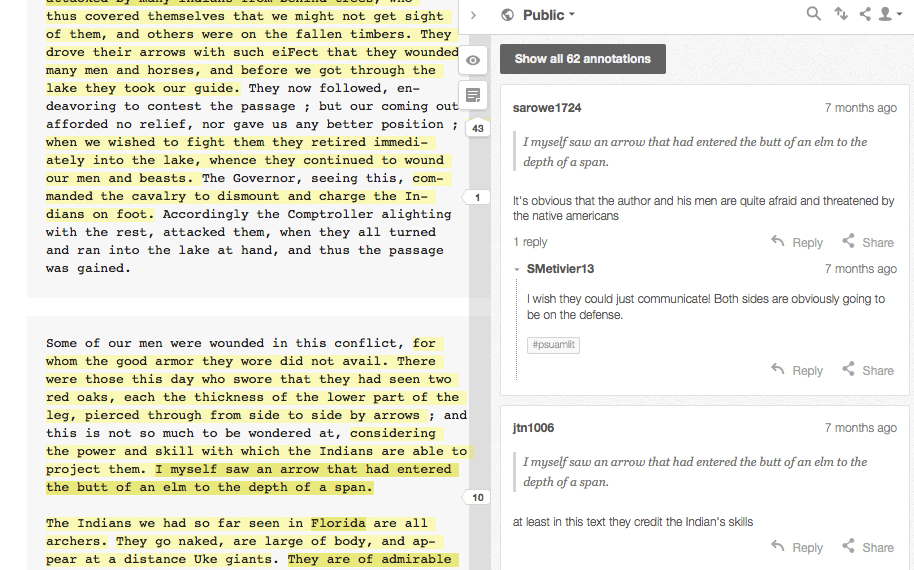
Annotated with Hypothes.is

Annotated with Hypothes.is

So I added an app called “Hypothesis” to the course, which allows readers to take notes on the text digitally.  Because we set our notes to “public,” students in my course (and in other courses at other colleges!) could see each others’ annotations and comment on them.  Almost immediately, we all realized that it wasn’t the digital quality of the notes that was engaging; it was the social quality of the notes.  Suddenly, our student-created textbook was turning into a cacophonous, heteroglossic tapestry of voices talking to each other about the literature.  While it may very well be true that taking notes longhand can help students recall specific detail more effectively than taking notes on a laptop, the question of how digital annotation of a text differs from hand-written annotation seems distinct, and there is no question that there were certain dimensions that opened up when we allowed the annotations–allowed ourselves– to talk to one another within the context of the close reading.

When I finally had time to sit down and take stock of what was happening, I realized a few things.

  • The open textbook allowed for student contribution to the “master text” of the course, which seemed to change the whole dynamic of the course from a banking model (I download info from the textbook into their brains) to an inquiry-based model (they converse with me and with the text, altering both my thinking and the text itself with their contributions).
  • The digital textbook meant they all had the book on Day 1 and nobody was behind, which seemed to level the playing field so we were all contributing more evenly than I had seen in the past.
  • The fact that there were no limits on the kinds of things we could add into the textbook seemed to engender creativity in students, and allowed them to play to their strengths in figuring out what they brought to the table. This looked more like a real-world group project, in which team members would be asked to bring their talents to bear on some task.

As all of this became more evident to me, I began to be more concerted about playing up the open pedagogy that was developing.  I became more reliant on Twitter as a tool in our class, and worked to develop the class community on our course hashtag, with the idea that letting students feel connected to each other outside of class would help them begin to engage with the work more as scholars and less as students.  I opened Twitter chats with working scholars, tweeted links to their own student blogs when they interested me (we worked mostly outside of the LMS), and encouraged them to share their own work across whatever social media platforms they enjoyed using.

Student Blog About Hypothes.is

Student Blog About Hypothes.is

I also realized that my course was basically functioning as a MOOC (minus the “massive”–maybe it was a PMOOC: “Potentially Massive Open Online Course”).  The text was free online. The syllabus and all assignments were online. The annotation system was publicly accessible, and the students were mostly all blogging on public websites that they built.  Many class discussions had Twitter chats embedded inside of them, and any of the lectures I gave were livetweeted (pre-Periscope!). While we still had a sense of intimacy and trust in our classroom, it seemed to liven everything up to connect our work as scholars of history and literature to larger communities outside of that classroom.

Now I want to pause for a second and get off the hype-mobile that I have been riding so far in this post.  While it’s true that the creation of the open textbook absolutely transformed my teaching and my pedagogy, and while it is true that an open textbook has much more to offer faculty and students than cost-savings, it is not true that the open textbook is magic.  For every affordance it offered, my open textbook also revealed serious pitfalls, barriers, and challenges that I am still working out.  Here are a few of them, which I hope to tease out more thoroughly in my work over the next year or so:

  • If OER is free, what hidden costs exist in using it that still hinder student access to education?  For example, at my institution, 94% of students come to school with a laptop, which mostly means that my university wasn’t too worried about providing laptops for students because (as one colleague told me) “they all have them.”  But all meant that in my 25-student classes, there were regularly 1-2 student(s) who didn’t have a machine.  In order to do what I wanted to do with the digital textbook and the connected learning, I had to first work to get a laptop rental program installed in my library to ensure that my students all had access to hardware.  I also had to spend a LOT of time going through each step of basic tech set-up.  Because the “digital native” concept is (still a) fallacy, and because my institution does not fully cover basic electracy (I just learned that word from Gardner Campbell and Alex Reid) or digital literacy skills at the introductory level, I couldn’t shorthand things like “create a Hypothesis login” without immediately leaving some students behind.  While I am all for letting students find their own way through the acquisition of specific tech skills, this self-directed approach to tech learning is something that has to be modeled and facilitated to ensure that students who are newer to technology can participate fully.  Bottom line, opening one line of access to a free eBook doesn’t erase about a zillion other access issues that you will want to acknowledge honestly and assertively.
  • If OER is free, what hidden costs exist in its production? Making these textbooks is taking me a chunk of time in the off-season.  Thanks to my salaried position, I feel ok about putting in the overtime, but it’s a privilege my colleagues who teach under year-to-year part-time non-contracts can’t afford. Who should be funding OER creation? Institutions? Students? For-profit start-ups? How will you invest time in this project without obscuring the true costs of academic labor? Right now, we pass the corruptly high cost of academic publishing onto the backs of academia’s most vulnerable members: students. But as OER gains steam, we need to come up with funding models that don’t land us back in the same quagmire of exploitation that we were trying to get out of.
  • Working in public is exciting and enriching, and I have seen my students thrilled by the connections they have made and engaged by the ability to produce work for a larger academic commons.  That being said, working in public, and asking students to work in public, is fraught with dangers and challenges.  Students need to understand privacy and safety issues (and so do we; in case you haven’t had FERPA waved in your face recently let me do that for you now). They may not know about trolling or how to respond to it (seriously, we can’t even say there is a universally agreed-upon best practice for handling trolling). They may (will) face vicious harassment, racism, sexism, homophobia, and all of the other things that we do a reasonably good job at regulating in our classrooms (maybe?), depending on the kind of work they do or the kind of digital profiles they put forward, purposefully or otherwise.  They will put crappy work online sometimes (sometimes they will know it’s crappy and sometimes they won’t); is that ok? Will it come back to haunt them when they look for a job (we need to take this concern seriously, given the debt they incur to study with us)? What professional risks do I assume when my pedagogy is so fully exposed? And who in the academy can afford to take those risks…and who cannot?

So yeah, that’s only three bullet points, but there are so many threads embedded in each of those, I think I will stop there.

Here’s the takeaways, for those of you who are first and last paragraph readers:

CCBYNC Canadian Pacific https://flic.kr/p/ey9Qs1

CCBYNC Canadian Pacific https://flic.kr/p/ey9Qs1

Open textbooks save money, which matters deeply to our students. But they can also create a new relationship between learners and course content, and if teachers choose to acknowledge and enable this, it can have a profound effect on the whole fabric of the course. Jumping into the “open” part of the open textbook means opening our eyes to the real hazards and challenges of connecting our courses to a wider public.  I am no expert on any of this, and I welcome feedback and thoughts (and suggestions for further reading) as I start to pick my way through this kind of teaching. My best advice is just to share your experiences and roadblocks with others.  Lots of people are promising that “open” is a panacea for everything that ails us in education, and lots of people are rejecting “open” for its failures to deliver on that promise. Both of those positions seem reductive to me. So maybe I’ll leave with two questions aimed at opening, rather than closing, the conversation:

  • Do you use an open textbook? If so, what’s that “open” part doing to/for your course?
  • If you want to try incorporating an open textbook into your course but haven’t yet, what questions do you have before you’d want to give it a go?

[Photo walking frame by Andreas Wecker licensed CC BY-NC-ND 2.0]

]]>
50764