The idea of a tool parade is to get your feet wet … to consider what’s possible, and come away with a handful of tools you might want to explore more deeply. The idea is also to show how arbitrary the selection of a tool can be. And to consider what digital tools can’t do. As we plan for this tool parade, the DTLT team is gathering together here to sharing some of our favorite digital learning tools and resources…
Lee
TimeMapper: We frequently recommend tools like timeline.js, StoryMap, and Google My Maps. The tool TimeMapper combines some of the best of all three worlds — a collaborative Google spreadsheet that feeds into a timeline that also does points on a simple map. You can add rich media to the timeline and show how an event moves through time but also over space.
Web Literacy for Student Fact-Checkers: I mentioned this resource before, when Mike Caulfield gave a talk last semester here at UMW, but it bears repeating. This is an invaluable resource for any faculty interested in integrating digital fluency into their courses. It is open-licensed and flexible, filled with relevant activities for students (and faculty!) to test their skills. It is an important new resource for our digital age.
Nigel
Pixlr is a browser-based photo editor. You can think of it as a pared-down version of Photoshop. You might use this program for some basic graphic design as well as photo editing. You can use layer and clipping masks, spot removal, image warping, and a number of other adjustments to things like contrast curves, white balance, and sharpness to really manipulate images beyond basic Instagram-like filters.
Screencast-o-Matic is a web-based screen recording program which also allows you to record your webcam. For free, you can record up to 15-minute videos and do some basic editing, then download the file to your computer or upload to YouTube. The ability to record your webcam and screen at the same time, as well as show where your cursor is clicking, makes for a really streamlined way to record online mini-lectures.
Jesse
Ghost is a streamlined blogging platform that just came out of beta. It currently must be installed on a dedicated server, so can’t yet be used on a shared-hosting platform like UMW’s Domain of One’s Own. My own site is currently being hosted by Ghost(pro), the Ghost non-profit’s own full-service paid hosting option. Even if there are still some barriers to entry for using Ghost, I am curious to find more ways to use it, because of the (somewhat nostalgic) joy and immediacy I’ve felt blogging with this tool.
World Time Buddy is a simple web-based tool I use for coordinating meetings or events across several time zones. Using it for years has helped me think about how we can (and can’t) productively work synchronously on an international scale. What you quickly realize as you start using it is that it’s not possible to make a synchronous event accessible to everyone around the world, but there are new ways we can think about our work to reach beyond our geographical context.
Jess
Bit.ly is a tool that has a plethora of uses, but the most common use is link shortening. What does that mean? Well it means that I could take a link like this: https://docs.google.com/presentation/d/1MhoMDj5wbgC9zolSE-6NY0RKD1pbvn-1_6T-o9jnSt4/edit#slide=id.p and turn it into this: bit.ly/student-technologist.
This is useful in many settings including conferences, meetings, group messages, and in the classroom. Sharing a link to a document, slideshow, or image during class can be a hassle. When you are able to share a very short link with the class, the students will be able to visit the content quicker and will be able to remember the link better outside of class. Bit.ly also includes analytics on the link, meaning you can see how many people have clicked the link.
Ghostery is a browser extension available for all of the major browsers as well as the mobile browsers on Android and iOS. Ghostery detects and blocks trackers on websites, which in turn decreases the page load time, eliminates clutter, and protects your data. With the tool, you will also be able to see what the individual trackers are. Protecting your data is something every web user should consider, because your information is out there. We often do not realize how much information we are sharing across the web. We sign up for accounts with our birthday. We fill in our political stances. We add profile pictures. We fill in our employer addresses. All of these bits of information are being picked up and shared. Taking a step to keep some of this personal data secure can help protect your digital identity as well as your in-person identity.
Kris
Known is a lightweight platform for Domain of One’s Own that supports simple, socially minded sites, like blogs, discussions, or even your own personal Instagram. But there’s one thing that Known is really great at supporting — podcasts! You simply login to your site, click on “audio,” upload your podcast’s audio file, and you’re done! You can even use a hashtag (like #podcast) to create a separate podcast feed on a site that also hosts videos, pictures, or blog posts. To try it out on Domain of One’s Own, login to umw.domains and use the Installatron Applications Installer (like you would for WordPress). You can also get a free, but more limited, account on withknown.com.
And speaking of podcasts, FreeSound and SoundBible are two excellent repositories of recorded sounds for those podcasts or other audio (and video!) projects. Need a thumping heartbeat for that dramatic scene? A cackling hyena? The sound of running water? A baby babbling? These sites have you covered with audio clips you can insert into your recordings, or dub over your video, and they are free to use in academic and creative projects (usually with attribution). We even used some of these sounds for our thriller movie, “The Convergence,” premiering on October 4 in the HCC Digital Auditorium!
If it’s free stock video you’re after, check out Pexels Video for a variety of video clips you can use for free, without attribution, for your film projects, or to have some interesting video to play around with as you learn iMovie.
Even more!
We have written a number of posts about tools for collaborating, writing, visualizing, building community, and creating media on the blog. Check them out!
- Tools for File Sharing and Collaborative Writing
- Choosing a WordPress Theme
- Tools for Collaborative Image, Text, and Audio Annotation
- Building Community Online
- 10 Apps for Writing and Collaboration
What are some of your favorite tools? What new tools should we be looking at? What challenges are you looking for a tool to solve? Let us know in the comments!
Watch a recording of the livestream:
Featured Image by WaleedPS on DeviantArt
]]>Obviously, that type of online experience is not good for the student, and cheapens the role of the faculty member in the educational experience. But the LMS can provide for a relatively rich online experience if you dig just a bit deeper into the interface. I’ll be going over some of these features in my upcoming design sprint, “More than a Data Dump: 10 Tools for Creating Meaningful Interaction in Canvas.” In the meantime, here are a few recommendations that apply to any LMS or online platform:
- Don’t be an egg! If you’ve ever used Twitter, you know that the default profile picture is a colored egg. This is a sign to other users that you are new, you aren’t good with technology and don’t know how to update your photo, you don’t care, or you’re a bot. Updating your photo in an LMS or other platform goes a long way toward humanizing you in any online space. We’ll go over how to do this and other ways to humanize yourself in Canvas during the design sprint!
- Death by discussion board. If you’ve ever taken an online course, you’ve probably encountered a discussion board. These have great potential, but leading discussions in an asynchronous online environment involves different strategies compared to in-class discussion. Prompts asking students to “respond to the reading” often fall flat because they are vague or cause cause students to worry about looking stupid in front of their peers. Giving students a way to respond that allows them to offer value or expertise is one way to reduce face-threat and spur more meaningful discussion. We’ll talk about this and walk through some features in Canvas that can help set the stage for quality, engaged discussions.
- Finally, I want to circle back around to assessment – what can we do beyond readings and quizzes? There are actually quite a few features in Canvas (and other LMSs) that provide for student-to-student interaction. If you’re teaching a writing-intensive course, you could make use of the robust peer-review features. This summer, I’ll be using the discussion board to have students submit digital projects. This allows them to showcase their work to their peers while giving me an opportunity to provide them with a score in the gradebook.
I’ll be returning to this topic later this month with additional strategies and “how-to” instructions specific to Canvas, the LMS we use here at the University of Mary Washington. If you’d like a more hands-on demo of these features, make sure to join us for “More than a Data Dump: 10 Tools for Creating Meaningful Interaction in Canvas” as part of our Digital Liberal Arts series at 4:00pm on Monday, November 7th in HCC 407.
]]>If you weren’t able to join us for the town hall, you can still catch the live stream below:
Here are a few of the topics we covered in the Town Hall event:
- What does a liberal arts experience look like for increasingly non-traditional students (i.e. working adults, commuter students, fully online students)?
- How do we as faculty and institutions advocate for and build structures to support these non-traditional students?
- Where does learning happen? As a public liberal arts institution with an obligation to the people of the state, how do we redesign course structures (scheduling, credit hours, seat-time etc.) to make education accessible?
- What’s the value of a degree? How do new ways of thinking about credentialing sit alongside the value of liberal arts education? Again, how can liberal arts institutions help drive thinking about enrichment courses, certification, continuing education, lifelong learning?
- What counts? How do we respond to the litany of buzz words like mastery, badging, bootcamps, gamification, prestige, and grit?
As you can see from the range of topics, we covered a lot of ground. The conversation came to a close with the realization that these questions are not necessarily new – institutions continually evaluate themselves and adapt to their environment. One of the themes I heard was that we now have an opportunity to bring value to our community in new ways, through reaching new student populations and new channels through which we can interact with the community. Our faculty also thoughtfully reflected on the changing expectations among our student population for communication, especially as we reach more adult and working learners. If meaningful student/faculty interaction is a key component of the experience we offer as an institution, we should highlight that question as we design our online courses and programs.
We followed this up with a design sprint focused on public annotation in Hypothes.is, which we felt represented the type of open work we may see more of in the near future of the digital liberal arts. Not only was this a great opportunity to kick the tires on an annotation platform — we also had a discussion about the ethical implications of annotating in public on webpages and documents. We shared some resources on annotation, including Jeremy Dean’s blog at Hypothes.is.
Next month we’ll be talking about ethical online learning, starting with Town Hall on Tuesday, November 1 at 4pm in Digital Auditorium. You can join our webcast live and chime in to the conversation any time on Twitter using #DoOO. Hope to see you there!
]]>There was much agreement on the town hall panel about the nature of the liberal arts, and the discussion about how the digital changes that was spirited and thought-provoking. Knowing that while we don’t yet have all the answers, we have faculty here at UMW who are doing work every day with and for students to move the liberal arts forward.
If you couldn’t join us for this month’s events — no worries! Here is the live stream from the town hall:
The design sprint ended up being my favorite event (and I’m not just saying that because I led it ;-)) The hands-on approach really allowed faculty to dig into the details of specific issues they are facing here at UMW, and the specific opportunities they encounter in their day-to-day work. We started the design sprint by asking faculty to identify specific challenges and opportunities we face at UMW regarding the digital impact on the liberal arts. We brainstormed a list of granular issues, which we then organized into themes. We then split into groups to talk about how we would address those themes in our specific disciplines. We came back together to reflect on the question, “What does the digital do to the concept of disciplinarity?”
Ultimately, the groups came to similar conclusions: There are competing tensions shared across disciplines. Privacy vs. collaboration and sharing, increased access to information vs. information overload, new tools and platforms vs investment in time and hardware, among others. One group noted that these types of tensions are necessarily unique to the digital liberal arts, which spurred an engaging discussion of the nature of the academy, and how it has balanced similar tensions in the past. Personally, I came away from the event with a slightly new frame through which I view the impact of the digital – it seemed to me that we were discussing a completely social process. How do we reach our students? How do we work with our colleagues? How do we learn new skills? Are our pedagogies keeping up with the latest advances in our society? These are the questions the group came up with, and they don’t seem all that unfamiliar.
We will be continuing these discussions all year and hope you can join us for our next town hall focusing on the Future of Education.
Here is a Storify of the conversation on #DoOO from the town hall backchannel:
Photo by Philippe Gillotte (CC BY-NC-SA 2.0)
]]>Last week, an article entitled “UMW Announces New School for Graduate, Continuing and Online Education” was published on Fredericksburg Today. The article focuses on what our new University president, Troy Paino, addressed at Fredericksburg City’s Economic Development Breakfast. The idea of a school of continuing and professional studies arose as a potential consideration for how UMW can handle and adapt to the changing economy. Despite the rather hasty assumption by Fredericksburg Today that a new school was a definite plan, some important factors should indeed be considered when talking about the future of higher education.
The first is that increasingly students are coming to higher education with college credits from online courses or dual enrollment programs through their high schools. As a result, the need for entry-level courses and prerequisite courses could be smaller. Secondly, students attending four-year colleges may begin to seek out online or summer credits from other institutions to complete their degrees quicker. Lastly, graduate certificates are a rising trend because as Paino explains, certificate programs build upon students’ degree or partial degrees. Higher education institutions are already attempting to adapt to these education trends, but there is still much to discuss, and this what we’d like to do during this Town Hall.
The future of Education Town Hall will be an open forum. Members of DTLT will briefly raise and talk about five questions regarding the future of education, and then we encourage the rest of the community to participate by sharing their thoughts and concerns, and by posing other questions around the topic. Instead of just moderating the discussion, as we intend to do with many of these Town Halls, our goal with this one is to join the fray more directly. As a new team, this will give DTLT an opportunity to lay some of what we value more clearly on the line. And our group is particularly primed to speak on the topics of this town hall. We hope the conversation will help drive thinking about how the UMW community can lead and model new approaches to education.
The following are just a few of the questions we hope to discuss:
- What does a liberal arts experience look like for increasingly non-traditional students (i.e. working adults, commuter students, fully online students)?
- How do we as faculty and institutions advocate for and build structures to support these non-traditional students?
- Where does learning happen? As a public liberal arts institution with an obligation to the people of the state, how do we redesign course structures (scheduling, credit hours, seat-time etc.) to make education accessible?
- What’s the value of a degree? How do new ways of thinking about credentialing sit alongside the value of liberal arts education? Again, how can liberal arts institutions help drive thinking about enrichment courses, certification, continuing education, lifelong learning?
- What counts? How do we respond to the litany of buzz words like mastery, badging, bootcamps, gamification, prestige, and grit?
Join us Tuesday, October 4th at 4:00pm at the Hurley Convergence Center Digital Auditorium. If you can’t make it in person we’ll post a link to the live stream on the schedule for the series, and you can join the backchannel on Twitter with #DoOO.
Also, mark your calendars for Wednesday, October 12th at 4pm for the second Design Sprint, where we will experiment with the collaborative annotation tool Hypothes.is as we further explore the questions raised during the town hall.
Photo by julochka (CC BY-NC 2.0)
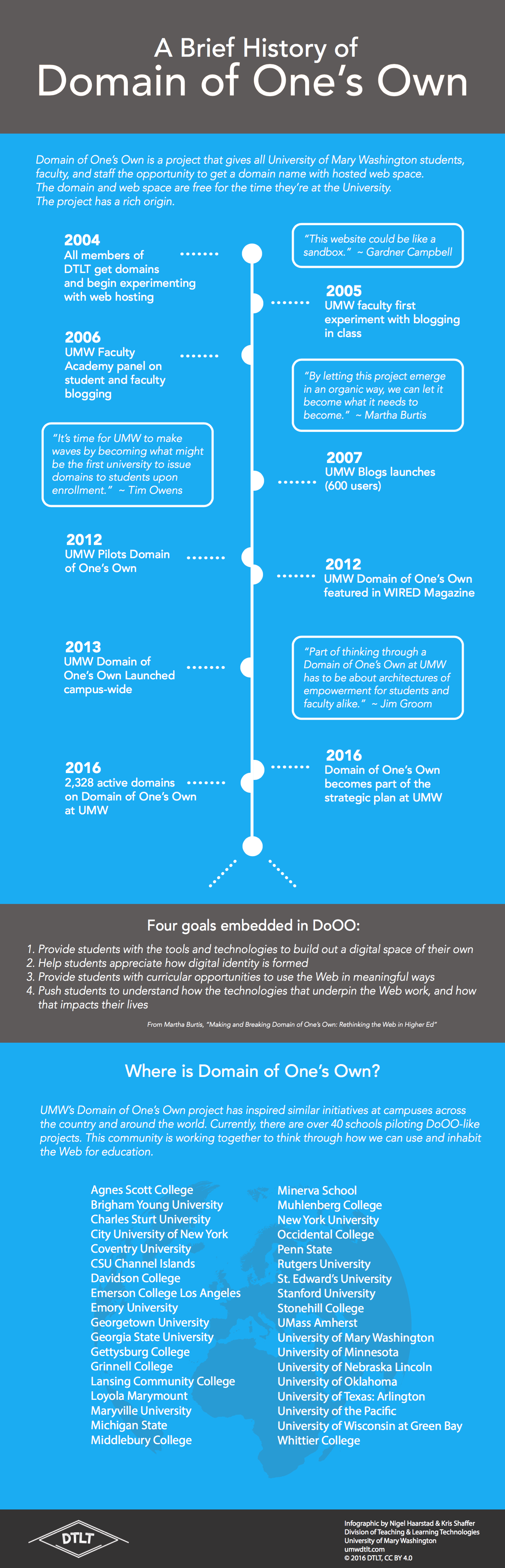
]]>Domain of One’s Own is a project that is deep, broad, and growing. As Jess and Jesse wrote, “we find ourselves looking back even as we look forward.” As we at DTLT collaborate with our faculty and students to keep imagining the future of Domain of One’s Own at Mary Washington, we are both humbled and exhilarated by the efforts that so many have ― and continue to ― put into this initiative, here and elsewhere. We hope this infographic becomes obsolete quickly, as new names and new projects emerge.
We’re excited to bring a variety of viewpoints to this design sprint through our team members, Nigel and Jess. Nigel’s perspective on the digital liberal arts and sciences formed through his training as a quantitative social scientist and his experience supporting the development of several online degree programs ranging from Statistics to Historic Preservation. He has studied firsthand how different approaches toward digital tools and pedagogy in an individual course can have macro-level implications, and vice versa. Because of this, Nigel is particularly interested in how programs and institutions will adapt to the rapidly evolving digital landscape. As a UMW student, Jess took courses that heavily incorporated the digital (e.g. Electronic Literature, Digital History), and she draws on those experiences to help faculty implement different digital models into their courses. She has a unique, and somewhat inside, perspective on what the digital has looked liked at UMW for the last five years, from being a pilot member on Domain of One’s Own, to being a Digital Knowledge Center tutor, and now as a member of DTLT. She understands what the workflow is like when managing and utilizing digital platforms and tools.
Through guided brainstorming and problem solving at this session, we will collectively break down the opportunities and challenges of the digital liberal arts and sciences further to discover what similarities and differences we encounter with the digital across disciplines. Perhaps the tools and the ways in which the digital are implemented into different disciplines differ? Perhaps the overarching goals are the same? By breaking these ideas down into specific items we hope to objectively look at the issues and opportunities faculty are facing at UMW. Ultimately we will attempt to answer: What does the digital do to the concept of disciplinarity?
We look forward to seeing many of you there!
Image by torbakhopper licensed CC-BY 2.0
]]>Beyond that point, we quickly get into uncomfortable territory. With my administrative account, I have a log of every single page each person viewed and when they viewed it – instructors and students alike. We can determine the IP addresses from which the pages were accessed, giving me knowledge of your location. With a few lines of code and some knowledge of Excel, I can write a script that shows me how long it takes each instructor to return assignments to students after they’ve been submitted, how that changes throughout the semester, and how one instructor’s turnaround time compares to another. (To be absolutely clear, I have no intention of ever actually writing that script). As Jesse Stommel writes in his article in Educause, the amount of data is only going to increase as schools embrace the Internet of Things. His assertion about the Internet of Things applies just as well to the omni-present LMS and other ed tech:
“At the point when our relationship to a device (or a connected series of devices) has become this intimate, this pervasive, the relationship cannot be called free of values, ethics, or ideology.”
I’ve been thinking a lot about the values, ethics, and ideology I bring as an administrator over our LMS, and how that impacts the people who use it. By any definition, it is a pervasive part of the UMW experience. Luckily, I work for an institution which seems to value integrity and ethical handling of data, and I don’t expect anyone to ever ask me to run any Orwellian reports on an instructor’s productivity or the like. But, when push comes to shove, how, exactly, are we protecting all of this institutional and often quite personal data? If an influential administrator somewhere asks a new employee to produce a report that seems to violate the privacy or humanity of faculty or students, what incentive does that employee have to say no? Should they?
To that end, here are a few ideas I’ve been rolling around:
A Strong Safety Culture and Stop-Work Policies
This is something we can begin to implement immediately in your own units. The Occupational Safety and Health Office (OSHA), describes a strong safety culture as “shared beliefs, practices, and attitudes” where “…everyone feels responsible for safety and pursues it on a daily basis.” Establishing norms, telling stories, and feeling empowered to bring up concerns are just a few of the ways this might manifest itself. Though OSHA’s definition was created with physical safety in mind, it transfers easily to the idea of institutional data ethics.
Stop-work policies are a natural extension of a strong safety culture. These policies started in our assembly lines and on oil rigs. If any member of the team sees something that seems unsafe or out of place, that worker has the authority to stop the entire assembly line until the issue is addressed. Applied to data ethics, this is simply a more formal and robust implementation of a strong data safety culture.
Inserting Ethics into Policies
This seems obvious, but is worth reflection. Clear policies help empower individuals with stop-work authority by reducing ambiguity. At my current institution, we have clear and concise rules meant to safeguard sensitive data. Our students and faculty have an expectation that their personal data will remain private and that those of us who handle their data will treat them with respect and dignity. In my experience so far, those ethical expectations do not always accompany the policies themselves, which are usually list prohibited actions. Our policies could be bolstered by illuminating the ethical and ideological underpinnings from which they are derived.
IRB for Institutional Data
I’ll admit, I’d rather avoid the bureaucracy of dealing with the Institutional Review Board, but they exist for a very good reason. There is often an incentive to cut corners when it comes to human-subjects research, and unfortunately we’ve seen what can happen when we don’t protect the rights of our research subjects. The Belmont Report and a school’s Institutional Review Board hold us accountable to the people whose information we exploit for our own ends. Faculty, instructors, and staff deserve the same levels of protection we afford to human subjects in our research, even if the ‘research’ is only being used internally. I realize we’re running a business, but it’s a special kind of business where a safe space for learning and innovation must be protected. In order to protect that core mission, we need to treat our faculty, students, and staff as humans and not just as data points. In practice, Institutional Review Boards draw members from various units across the university, providing a more objective space for evaluation and dissent which may be less likely under the usual chain-of-command.
Is all of this really necessary?
As I write this, these suggestions seem to go a bit overboard. I have no desire to create more work for myself or any of you, and we do have to balance personal privacy and freedom with the ability for faculty and administrators to actually run an effective institution. But I also work at a school with a strong eye toward ethics and approachable administrators to whom I feel comfortable bringing concerns. That’s a start, and I’m glad it’s worked so far. With such a vast and growing amount of institutional data, it’s time to move beyond a policy of winging it and trusting people to do the right thing. It’s time to formalize our approach regarding the values and ethics we bring to bear when using institutional data.
How does your school address the internal use of institutional data? Is there a clear ideology or code of ethics you employ?
Image Security by Ricardo Rodriguez licensed CC By-NC-ND 2.0
]]>We’ve always been dependent on classroom technology like this. Chalk would break and bulbs would inevitably burn out in overhead projectors. But an instructor could generally fix those issues themselves – go to the closet and grab more chalk or a new lightbulb. What happens when the problem is a broken line of code on a server far away? Who fixes that?
The answer, it seems, is a lot of people. Many people get involved whenever anything goes wrong with classroom technology. Take, for example, a recent experience I had helping a professor integrate ‘clickers’ into their course. This took an enormous number of person-hours to resolve and it went something like this:
- 3 weeks to turn around a user agreement
- 3 days to create a (broken) integration
- 1 day for the vendor to admit they did it wrong and fix it
- A few hours of the professor’s time trying to diagnose why it’s still not working
- half a day for the vendor to get back to me to tell me their instructions are incorrect and send me updated install instructions that contradict their installation manual
- half a day to fix their integration (again) after I told them it’s pointing to SW Oklahoma State instead of UMW’s single sign-on page
- a few hours to diagnose why it’s still not working
All of those steps took a while because of the number of cooks in the kitchen. Everything we did seemed to involve another office: The vendor’s sales team, procurement, DTLT, the professor, the vendor’s integration team, the vendor’s help desk, the LMS help desk, etc. This one tool, which played a part in just one course for five students, ballooned into a giant project because of all the communication that needed to take place to coordinate its integration.
Now imagine this sort of endeavor at scale. How many teaching and learning technologies do we depend on at our institution? How do they talk to one another? How many people does it take to keep those systems working smoothly together or resolve a technical problem? And what about students? Do they go to our Help Desk, the professor, or the vendor when they have trouble? How many meetings will it take to hammer out that process?
Most of us no longer teach in a world where we can replace the chalk when it breaks. Instead, fixing something that breaks in the classroom now involves, at minimum, doing some Googling or emailing a support agent. So, what do we do with that information?
One way I start is to simply know what I’m working with. I tally up the different technologies I’m using in the course. Am I using a Learning Management System? A WordPress site? Another piece of software? Online material from a publisher? Does one depend on the other? What are the things that might go wrong?
Second, I have a backup plan. How will I teach if one of those systems doesn’t work as planned? As much as I love technology, I ask myself what the technology adds to the course. Does it actually enhance learning? Does it make the student’s experience better in some significant way? If it doesn’t, should my backup plan become my main plan.
Finally, I ask for advice, either from a colleague or someone in a role like mine at DTLT. One of my roles as an Online Learning & LMS Specialist is to help professors make informed choices and learn about the systems they use. My colleagues and I here in DTLT help faculty integrate these tools into their courses in meaningful ways, while avoiding the pitfalls.
Teaching in today’s classroom involves having a basic understanding of the tools teachers and students decide to use and what we can do when those tools don’t operate as expected. If you’re prepared for the occasional glitch, it becomes just that – a glitch – rather than a crisis.
*Turkeys have a reputation for not being the most intelligent of birds. Growing up, my grandparents always loved to tell me that, during a rainstorm, turkeys will stare up at the sky in confusion with their beaks hanging open, transfixed, until they drown.
[Photo 2222 by Thomas Hawk licensed CC BY-NC 2.0]
]]>As more courses are offered in online and hybrid formats, instructors will need to rethink how they build community and foster interaction in their courses. Communication in a learning management system, on Twitter, or via a blog is different than the type of interaction we’re used to facilitating face-to-face in a classroom.
To tackle this question, we decided to kick off the Division of Teaching and Learning Technologies’ #DoOO series of panel discussions by talking about the ways our faculty and students have fostered community and interaction using a variety of digital tools in their courses.
Panelists included:
Martha Burtis – Director, Digital Knowledge Center (@mburtis)
Jeanine Davis – Assistant Professor, Education (@janinesdavis)
Claudine Ferrell – Professor, History
Nora Forknall – Senior, Biology and German major, Chemistry minor, and DKC Tutor (@agent_forknall)
Parrish Waters – Assistant Professor, Biology
Zach Whalen – Associate Professor, English (@zachwhalen)
Lee Skallerup-Bessette (Moderator) – Instructional Technology Specialist – DTLT
The panelists covered a lot of ground, describing a wide variety of approaches and tools they’ve used to foster community including Canvas, BluePulse, blogs, Twitter, Facebook, and Slack. Whether on the password-protected pages of Canvas or Slack, or publicly on Twitter or in a blog, the panelists generally had success, but found that the medium influenced how that community took shape.
One of my favorite points from the discussion was made by Zach Whalen, who reminded us that “silliness can help build community.” Of course, we want students to achieve the learning objectives and complete assignments, but community is more than a group of people independently performing the same tasks. Even in a single classroom, community is complex and multifaceted. A student asks a thought-provoking question. The professor gets sidetracked. The fire alarm goes off. When we move our courses online, we should think about the ways we can foster these shared interactions.
Especially in the early days of the semester, modeling your expectations is one way to encourage quality participation. Martha Burtis explained the motto used by DS106 instructors: “We eat our own dog food.” By this, she means that instructors completed the assignments alongside students to model what they were looking for and to engage with the students in class discussions. Modeling doesn’t just help set expectations, it also helps students feel connected to their instructor, which can increase students’ willingness to participate and improve student learning.
Student agency was also a topic the panel circled around — both in how and when students interact with one another, and how the instructor interacts in these moments. When students have a hand in shaping the conversations while the instructor remains attentive and receptive, allows for greater student ownership over their learning. This not only helps foster community, but also student engagement more generally. The students take pride in what they build.
The panel was wide-ranging in their discussion — far more than I can cover here. Join in the discussion in the comments or on Twitter through #DoOO.
[Photo “Moss Spores” by Benjamin Balázs licensed CC0 1.0]
]]>