The idea of a tool parade is to get your feet wet … to consider what’s possible, and come away with a handful of tools you might want to explore more deeply. The idea is also to show how arbitrary the selection of a tool can be. And to consider what digital tools can’t do. As we plan for this tool parade, the DTLT team is gathering together here to sharing some of our favorite digital learning tools and resources…
Lee
TimeMapper: We frequently recommend tools like timeline.js, StoryMap, and Google My Maps. The tool TimeMapper combines some of the best of all three worlds — a collaborative Google spreadsheet that feeds into a timeline that also does points on a simple map. You can add rich media to the timeline and show how an event moves through time but also over space.
Web Literacy for Student Fact-Checkers: I mentioned this resource before, when Mike Caulfield gave a talk last semester here at UMW, but it bears repeating. This is an invaluable resource for any faculty interested in integrating digital fluency into their courses. It is open-licensed and flexible, filled with relevant activities for students (and faculty!) to test their skills. It is an important new resource for our digital age.
Nigel
Pixlr is a browser-based photo editor. You can think of it as a pared-down version of Photoshop. You might use this program for some basic graphic design as well as photo editing. You can use layer and clipping masks, spot removal, image warping, and a number of other adjustments to things like contrast curves, white balance, and sharpness to really manipulate images beyond basic Instagram-like filters.
Screencast-o-Matic is a web-based screen recording program which also allows you to record your webcam. For free, you can record up to 15-minute videos and do some basic editing, then download the file to your computer or upload to YouTube. The ability to record your webcam and screen at the same time, as well as show where your cursor is clicking, makes for a really streamlined way to record online mini-lectures.
Jesse
Ghost is a streamlined blogging platform that just came out of beta. It currently must be installed on a dedicated server, so can’t yet be used on a shared-hosting platform like UMW’s Domain of One’s Own. My own site is currently being hosted by Ghost(pro), the Ghost non-profit’s own full-service paid hosting option. Even if there are still some barriers to entry for using Ghost, I am curious to find more ways to use it, because of the (somewhat nostalgic) joy and immediacy I’ve felt blogging with this tool.
World Time Buddy is a simple web-based tool I use for coordinating meetings or events across several time zones. Using it for years has helped me think about how we can (and can’t) productively work synchronously on an international scale. What you quickly realize as you start using it is that it’s not possible to make a synchronous event accessible to everyone around the world, but there are new ways we can think about our work to reach beyond our geographical context.
Jess
Bit.ly is a tool that has a plethora of uses, but the most common use is link shortening. What does that mean? Well it means that I could take a link like this: https://docs.google.com/presentation/d/1MhoMDj5wbgC9zolSE-6NY0RKD1pbvn-1_6T-o9jnSt4/edit#slide=id.p and turn it into this: bit.ly/student-technologist.
This is useful in many settings including conferences, meetings, group messages, and in the classroom. Sharing a link to a document, slideshow, or image during class can be a hassle. When you are able to share a very short link with the class, the students will be able to visit the content quicker and will be able to remember the link better outside of class. Bit.ly also includes analytics on the link, meaning you can see how many people have clicked the link.
Ghostery is a browser extension available for all of the major browsers as well as the mobile browsers on Android and iOS. Ghostery detects and blocks trackers on websites, which in turn decreases the page load time, eliminates clutter, and protects your data. With the tool, you will also be able to see what the individual trackers are. Protecting your data is something every web user should consider, because your information is out there. We often do not realize how much information we are sharing across the web. We sign up for accounts with our birthday. We fill in our political stances. We add profile pictures. We fill in our employer addresses. All of these bits of information are being picked up and shared. Taking a step to keep some of this personal data secure can help protect your digital identity as well as your in-person identity.
Kris
Known is a lightweight platform for Domain of One’s Own that supports simple, socially minded sites, like blogs, discussions, or even your own personal Instagram. But there’s one thing that Known is really great at supporting — podcasts! You simply login to your site, click on “audio,” upload your podcast’s audio file, and you’re done! You can even use a hashtag (like #podcast) to create a separate podcast feed on a site that also hosts videos, pictures, or blog posts. To try it out on Domain of One’s Own, login to umw.domains and use the Installatron Applications Installer (like you would for WordPress). You can also get a free, but more limited, account on withknown.com.
And speaking of podcasts, FreeSound and SoundBible are two excellent repositories of recorded sounds for those podcasts or other audio (and video!) projects. Need a thumping heartbeat for that dramatic scene? A cackling hyena? The sound of running water? A baby babbling? These sites have you covered with audio clips you can insert into your recordings, or dub over your video, and they are free to use in academic and creative projects (usually with attribution). We even used some of these sounds for our thriller movie, “The Convergence,” premiering on October 4 in the HCC Digital Auditorium!
If it’s free stock video you’re after, check out Pexels Video for a variety of video clips you can use for free, without attribution, for your film projects, or to have some interesting video to play around with as you learn iMovie.
Even more!
We have written a number of posts about tools for collaborating, writing, visualizing, building community, and creating media on the blog. Check them out!
- Tools for File Sharing and Collaborative Writing
- Choosing a WordPress Theme
- Tools for Collaborative Image, Text, and Audio Annotation
- Building Community Online
- 10 Apps for Writing and Collaboration
What are some of your favorite tools? What new tools should we be looking at? What challenges are you looking for a tool to solve? Let us know in the comments!
Watch a recording of the livestream:
Featured Image by WaleedPS on DeviantArt
]]>We often see the digital as ephemeral, as virtual, as not real, but it has had an increasingly direct impact on our lives, politics, culture, and education. Putting the word “digital” in front of “knowledge” or in front of “liberal arts” begs a whole host of questions: What work does “digital” do as an adjective? What do we imply or privilege if we use it as a noun (“the digital”)? How do digital technologies change the ways we produce, disseminate and consume knowledge? Does social media indeed have a democratizing effect, as many have suggested? What inequities has it unearthed or enhanced? How are virtual spaces helping to enliven (or disengage us from) physical spaces?
And, importantly, when we say “digital knowledge,” how can we see knowledge as acting also upon the digital? What is the role for educators in helping construct new pathways into, out of, and around the digital? At University of Mary Washington, how does our shared commitment to the liberal arts give us tools for critically evaluating our digital technologies and for asserting agency in digital spaces where that agency might be under threat?
UMW’s Domain of One’s Own (DoOO) is both a platform and also a philosophical approach for exploring these questions — for helping educators and students alike think through their digital identities and their role in the larger community of the Web. DoOO also offers an incubator for experimentation with digital pedagogies and ethical online learning.
A Community of Practice
In Fall 2017, the Division of Teaching and Learning Technologies will gather together 6 – 10 UMW faculty and staff members for a series of discussions and practical labs centering around this idea of “Digital Knowledge.” We will meet 7 times throughout the semester for two hours. The first hour will be dedicated to discussing historical, theoretical, and pedagogical foundations for our work together. Some of these will be chosen in advance, but many will be suggested by the group, allowing the trajectory of our conversation to emerge organically based on the expertise and interests of the group. During the second hour, we will work individually and collaboratively to design digital projects for a future course or educational experiences (with support from members of DTLT and the DKC).
A Continuing Cohort
Members of this faculty initiative will be paired with one or more instructional technology specialists in DTLT for continuing support of their project. They will have the opportunity to gather in the Spring to reflect on their work. And we will host a panel in late Spring 2018 as part of our series of Digital Liberal Arts events.
A sampling of the kinds of readings we’ll discuss during the first several weeks:
Ray Bradbury, “There Will Come Soft Rains”
Audrey Watters, “The Web We Need to Give Students”
David Weinberger, Small Pieces Loosely Joined (preface and chapter one)
Seymour Papert, Mindstorms (preface and introduction)
UMW Full-time Faculty, Adjuncts, and Staff can click here for additional information and application instructions. (Applications are due by August 11.) But anyone can follow along via the event page, this blog, and the #DoOO hashtag.
Featured Image by Lance Asper on Unsplash
]]>???? On the 12th day of …
12 Data Points
University of Mary Washington’s Domain of One’s Own (DoOO) project currently hosts 2,422 active domains. The project launched over 4 years ago with 116 pilot domains. In Fall of 2013, Domain of One’s Own expanded as a way to give free domains and hosting to every student and, in fact, every member of the UMW community. Over the course of 3 years, there were 70 participants in Faculty Initiative, a Domain of One’s Own faculty development project. The Digital Knowledge Center, a peer tutoring center, opened in Fall 2014. Since then, the Center has offered 345 Domain of One’s Own tutorials. The most popular months for new sign-ups are January and September, marking the start of our semesters, but sign-ups continue consistently throughout the year (with as many as 850 new domains in a single year). This fall, we’ve already had 300 new users create domains. The Domain of One’s Own project continues to spread. Currently, over 40 other schools have active initiatives inspired by Domain of One’s Own and over 100 schools have individual faculty implementing DoOO at the course level.

11 Student Domains
Meredith Fierro, dgst395.meredithfierro.com
Madison Buechler, madisonbuechler.com/blog
Dominique Giles, tiredmimi.com,
Elaina Finkelstein, elainafinklestein.com
Amy Fanghella, delovelyames.com,
Natalie Griffitts, nataliegriffitts.com
Margaret Neubig, educationforpreservation.margaretneubig.com
Nancy Milroy, humansofumw.com
Amy Wallace, hist329.amywallaceumw.com
Amanda Halprin, www.amandahalprin.com

10 Articles
Audrey Watters, “The Web We Need to Give Students”
Andrew Rikard, “Do I Own My Domain if You Grade It?”
David Morgen and Pete Rorabaugh, “Building Community and Critical Literacies with the Domain of One’s Own Incubator”
Kate Bowles, “For Now, Our Own”
WIRED, “Domain of One’s Own”
Jim Groom, “A Domain of One’s Own”
Richard V. Hurley, “A Place of One’s Own — Online”
Martha Burtis, “Making and Breaking Domain of One’s Own: Rethinking the Web in Higher Ed”
Alan Levine, “Domains: Own, Value, Care, Time”
Debra Schleef, “Who’s Afraid of Domain of One’s Own?”

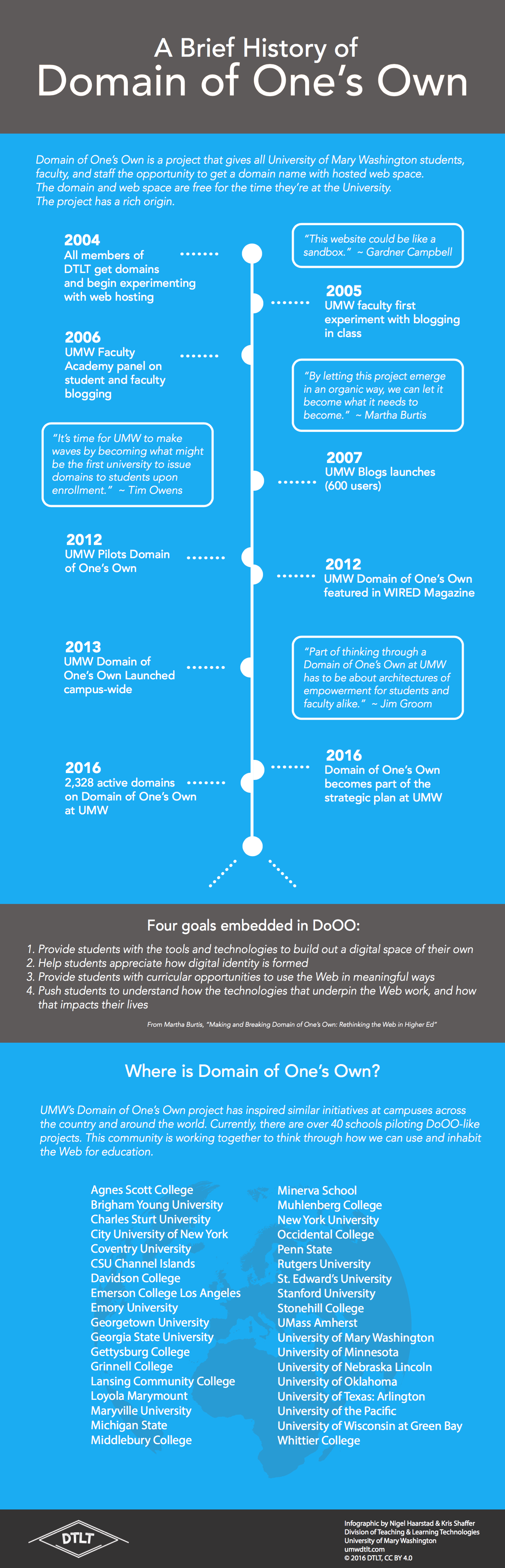
9 Significant Moments
2004 — All members of DTLT get domains and begin experimenting with web hosting
2005 — UMW faculty first experiment with blogging
2006 — UMW Faculty Academy panel on student and faculty blogging
2007 — UMW Blogs launches
2012 — UMW pilots Domain of One’s Own
2012 — UMW Domain of One’s Own featured in WIRED Magazine
2013 — UMW Domain of One’s Own launches campus-wide
2016 — Domain of One’s Own becomes part of the strategic plan at UMW
2016 — 2,422 active domains on Domain of One’s Own at UMW
Source: umwdtlt.com/an-infographic-of-ones-own

8 Faculty/Staff Domains
Zach Whalen (English, Linguistics, and Communication): amillionbluepages.net
Jack Bales (Library): wrigleyivy.com
Susan Fernsebner (History and American Studies): taipingcivilwar.org
Parrish Waters (Biological Sciences): umwvisionandchange.com
Melina Patterson (Geography): cities.melinapatterson.net
Kris Shaffer (DTLT): ds106.pushpullfork.com
Jeff McClurken (History): mcclurken.org
Andréa Livi Smith (Historic Preservation): survey.andrealivismith.com

7 Building Blocks
- Digital Identity
- What is a Domain?
- Understanding the Web
- Copyright, Fair Use, Creative Commons
- Digital Citizenship
- Data Ownership & Usage
- Representation (gender, race, culture, orientation)
Source: umw.domains/modules

6 DoOO Schools
These are just a small few of the schools with Domain initiatives:
University of Oklahoma, Michigan State University, Middlebury College, Davidson College, Whittier College, Muhlenberg College
Source: reclaimhosting.com

5 Brilliant Quotes
Jeff McClurken, “Digital History and Undergraduate Digital Literacy”: “Increasingly I have become convinced that a key, but often overlooked, aspect of digital literacy is a willingness to experiment with a variety of online tools, and then to think critically and strategically about a project and to identify those tools that would be most useful to that project.”
Martha Burtis, “Coding, Serendipity, and Domain of One’s Own”
“As digital spaces increasingly become the platforms upon which we live our lives, we must teach students to understand that those platforms are coded spaces, built by humans with business goals, political opinions, and complex identities.”
Audrey Watters, Claim Your Domain and Own Your Online Presence
“What do we want students to do or be in a digital world? If nothing nothing else, they should have agency, autonomy, and critical awareness of what it means to live, work, and play in a digital world.”
Doug Belshaw, “Digital Literacy, Identity and a Domain of One’s Own”
“A world where one’s primary identity is found through the social people-farms of existing social networks is a problematic one. Educators and parents are in the privileged position of being able to help create a better future.”
Maha Bali, “Sharing/Ownership ≠ Empowerment”
“We cannot assume agency. And we cannot assume lack of it. We cannot assume minorities will manage without support, nor can we assume they are incapable.”

4 Pedagogical Goals
- Provide students with the tools and technologies to build out a digital space of their own
- Help students appreciate how digital identity is formed
- Provide students with curricular opportunities to use the web in meaningful ways
- Push students to understand how the technologies that underpin the web work, and how that impacts their lives
Source: umwdtlt.com/an-infographic-of-ones-own

3 Founders
Martha Burtis
Jim Groom
Tim Owens

2 Reasons to Get a Domain
I, Jess, believe everyone should should be able carve out (and make decisions about) some small piece of the web. Having a domain is a way to own, or occupy, and to have an important kind of control over a space in the vast world that is the Internet.
I, Jesse, believe getting a domain is a very personal choice. It requires careful consideration of what it is to work on the web. Working in public is never without risk, but it means something very different when we are gay, women of color, undocumented, disabled, trans, students, teachers. The work is never as easy or as simple as buying a domain name or uploading an app to a shared server. I deeply respect the Domain of One’s Own project, because it has never made light of these things, and because it offers a space of possibility.

And 1 Domain to Rule them All
Yours…

Image by Markus Spiske CC-0.
]]>Online teaching is incredibly mundane. Or so it would seem given how infrequently people wave the banner of online teaching or champion online teachers. Much of the labor of online teaching is invisible. And most traditional approaches to online course design make teachers into mere facilitators or content providers, reducing teachers to bits.
My first forays into hybrid teaching were with one of my pedagogical mentors, R L Widmann, whom I began working with in 2001 to help develop her Virtual Shakespeare course. Because of my work with R L, my assumption has always been that online teaching can (and even should) be collaborative. (In 2015, we turned that course into a hybrid MOOC with on-ground components and over 20,000 students.)
When I started teaching fully online courses in 2007, I worked for Sean Michael Morris, who was Chair (at the time) of the English department for CCCOnline, the provider of online courses for the Community Colleges of Colorado. I did the thankless, and not altogether honorable, work of designing stock composition courses. About 30 – 50 sections of the courses I designed were “duped” and offered each term. 9 years later, the institution has only barely revised the courses (mostly to remove flexibility and add sterner instructions for students).
Years after I stopped working for CCCOnline, I’d still receive e-mails from students taking the courses, because teachers given a shell I’d designed would fail to update their instructor page, and my personal information would be left in the course. This happened many many times. Because of a very flawed system, 100s (and possibly 1000s) of students have believed I was their online teacher at an institution I had left many years before. The identity (and humanity) of the teachers of these courses mattered so little to everyone involved that this instructor page and its contents had grown vestigial. I suspect I’d still be receiving e-mails from CCCOnline students if I hadn’t obliterated the address I’d used on that page.
And, sadly, the most common e-mail I’d get from these students was concern about my absence from their course. The teacher hadn’t shown up to discussions or hadn’t shown up to grade student work, and because they also hadn’t shown up to edit their instructor information page, it was my absence that was felt by the students. I don’t begrudge these teachers. When I was teaching for CCCOnline, I was a road warrior adjunct, working at 4 institutions, teaching up to 9 courses per term. Even I sometimes forgot who I was. The problem was the precarious labor system (and bad instructional design decisions) that made all of this go.
Sean Michael Morris taught me how to teach online. And, while he worked as a department chair, Sean fought hard against the precarious labor system and the bad instructional design decisions being made (and still being made) at CCCOnline. He also helped me understand how to bring my full self to the work of teaching online. Sean has always said that he hates the internet, and this is also what makes him an excellent online teacher. He understands the limitations of the LMS and the complexities of digital identity, so he’s able to thoughtfully and compassionately navigate the work of teaching and learning online. Sean is, quite easily, the best online teacher I have known.
In preparing for DTLT’s upcoming panel at UMW about “Ethical Online Learning,” I wanted to find a way to champion more online teachers. The work of teaching online can be incredibly isolating, so I also wanted to give online teachers a list of people they could connect with. I started by putting the question to Twitter.
Assembling list of exemplary online teachers in and out of the LMS, ideally folks who’ve written about their work. Ideas? Links? Please RT.
— Jesse Stommel (@Jessifer) September 15, 2016
Almost immediately, I got an important question that helped me define the parameters for the list I’ve made here.
@Lawrie Positive examples, including various approaches, of online teaching broadly writ. Not to copy but to acknowledge and wonder at.
— Jesse Stommel (@Jessifer) September 15, 2016
What I’ve assembled are 15 online teachers active on Twitter who have inspired me (presented here in no particular order). I’ve also gathered a much longer list of crowd-sourced suggestions. Many of these are fully online teachers. Some teach courses of 25 students. Some teach to thousands. Some write about online learning in critical ways. Some are experimenting at the edge of on-ground and online learning. Some are online learners who have made their learning visible in ways that also makes them teachers.
1. Sean Michael Morris (@slamteacher)
“Post once, reply twice.”
Epitaph for online learning.#digped
— Sean Michael Morris (@slamteacher) February 18, 2016
2. Laura Gibbs (@OnlineCrsLady)
Today’s #growthmindset cat knows that learning is a superpower! More cats here: https://t.co/nP6QfJmIkW #MindsetPlay pic.twitter.com/gzON7vVrk2
— Laura Gibbs (@OnlineCrsLady) May 9, 2016
3. Al Filreis (@afilreis)
“ModPo: long live the online seminar.” Article today in PC Magazine: https://t.co/6IJGI788zi
— Al Filreis (@Afilreis) December 3, 2015
4. Maha Bali (@Bali_Maha)
Online Learning Experiences that Shape Us https://t.co/8ScuWxFHgp #edtech
— ℳąhą Bąℓi مها بالي (@Bali_Maha) February 9, 2016
5. Ana Salter (@AnaSalter)
My latest ProfHacker post looks at wrapping up + preparing for a new semester of my online Digital Culture class. https://t.co/g6IK5GXwWi
— Anastasia Salter (@AnaSalter) November 20, 2015
6. Alan Levine (@cogdog)
My 1st online teaching exp (2004) “Web-Based Teaching and Learning” http://t.co/QL9QIClO2C Course Descrip looks same http://t.co/oPIIf1zTST
— Alan Levine (@cogdog) February 17, 2015
7. Kathi Inman Berens (@kathiiberens)
My new post “The New Learning is Ancient”: http://t.co/HYYp4LJ4 On my F2F & virtual classroom. What can’t be digitized. #NITLE #MLA13 #ascj
— Kathi Inman Berens (@kathiiberens) December 6, 2012
8. Dave Cormier (@davecormier)
@Jessifer @raulpacheco @bonstewart @tressiemcphd @DrPetra Jesse and I spent an hour chatting about some of this once https://t.co/1TV6SWWTUx
— dave cormier (@davecormier) April 13, 2016
9. Cathy N. Davidson (@CathyNDavidson)
10 Things I’ve Learned (So Far) from Making a Meta-MOOC via @HybridPed http://t.co/98eTPBHXBt
— Cathy Davidson (@CathyNDavidson) January 16, 2014
1o. Donna Murdoch (@donnamurdoch)
I guest taught with @donnamurdoch and was awed by how generous a community she builds. I didn’t want to leave. https://t.co/qMb6Cd9kcB
— Jesse Stommel (@Jessifer) September 15, 2016
11. Michelle Pacansky-Brock (@brocansky)
Love letter to online learning by @brocansky https://t.co/R15oVazig0 @TLIatCI
— M Pacansky-Brock (@brocansky) April 26, 2016
12. Howard Rheingold (@hrheingold)
46 second video intro to The Peeragogy Handbook https://t.co/C8toJepLZR
— Howard Rheingold (@hrheingold) February 15, 2016
13. Steve Greenlaw (@sgreenla)
New blog post: “Journey into OER: My Quandary” https://t.co/mbQgbzdCtE Second in a series. @actualham @Jessifer @opencontent @VivienRolfe
— Steve Greenlaw (@sgreenla) February 1, 2016
14. Martha Burtis (@mburtis)
Was honored to speak last week for @DigPedLab. Full text of talk (and video/audio) are up today at @HybridPed https://t.co/GvNgD2OZT1
— Martha (@mburtis) August 20, 2016
15. George Veletsianos (@veletsianos)
Learner experiences with open online learning and #MOOCs e-book: http://t.co/C50WwMy8y5
— George Veletsianos (@veletsianos) September 24, 2013
Finally, one more extra special shout out to my dad, who teaches Psychology courses online for CCCOnline. He has always been one of my pedagogical models. He taught me that I wanted to teach. And I taught him right back. <3
16. Joe Stommel (@JoeStommel)
#4wordpedagogy always treat people well.
— Joe Stommel (@JoeStommel) May 1, 2016
Last, but certainly not least, the dozens of teachers also championed on Twitter in response to my call, many of whom I have admired for years and others I have only just discovered. It’s an amazing list of thoughtful, critical educators and technologists: @bonstewart @lizlosh @plowenthal @jgmac1106 @hypervisible @textpotential @profjuliette @Lorarts @KateMfD @profesor_curtis @GardnerCampbell @koutropoulos @rjhogue @tedmitew @CL_Moore @ReneeMiddlemost @amcollier @katiedigc @travisaholland @derekbruff @harmonygritz @kthompso @LisaMLane @mrkrndvs @johnjohnston @adamprocter @BryanMMathers @epilepticrabbit @krisshaffer @eylanezekiel @adelinekoh @iamjessklein @wiobyrne @oliverquinlan @mesterman @robert_schuetz @katrinamwehr @mizuko @MiaZamoraPhD @jenebbeler @jimgroom @harmonygritz @Jonthan_Worth @jadedid @LizFalconer80 @Chris_Friend @alexpickett
And I am certain there are many many more. These lists are nowhere near to complete (or even representative). Add the online teachers who have inspired you in the comments below, including folks that aren’t active on Twitter.
]]>For our next Digital Liberal Arts town hall conversation, we will be joined by an international group with experience researching online education, teaching online, teaching MOOCs, administrating online programs, and more.
PANELISTS:
Elizabeth Losh, William & Mary
Sean Michael Morris, Middlebury College
Kate Bowles, University of Wollongong, Australia
Alan Levine, Independent Speaker and Consultant
These four have given considerable thought to the shape and nature of education in the digital age. They are dreamers, skeptics, researchers, and artists. Together, they will push us to think about new approaches to online learning. Panelists will each offer short position statements before engaging our community in an open conversation.
UMW is thinking increasingly about ways to experiment with online learning — for Summer courses and for degree programs aimed at non-traditional students. Before we travel too far down this path, I find it important to pause and consider the broader implications of this work — and to talk very directly about how this work can be done thoughtfully and ethically. Having the diverse perspectives of these four panelists will help us as we continue to create our own conversations, as we continue to not shy away from asking the hard questions of online learning, as we continue to be models for other institutions exploring digital pedagogy. We need everyone at the table as we do this work.
Some of the questions we’ll consider during the Town Hall will include:
- What would a liberal arts online program look like? How can we imagine online learning that is “high-touch,” “socially engaged,” “critical,” and “active”?
- How would such a program be functionally and pedagogically different than a conventional online program? What are some of the models for this kind of work?
- What does (and can) online teaching look like? What are the possible pitfalls and opportunities?
- What are the challenges in administering online programs?
- How can we bring students more fully into the conversation about online learning — about the changing shape of their education?
In 2012, I wrote a piece called “Online Learning: a Manifesto.” Much of the conversation has changed since 2012, but much of it is still the same. In that piece, I argue,
The first mistake of many online classes is that they try to replicate something we do in face-to-face classes, mapping the (sometimes pedagogically-sound, sometimes bizarre) traditions of on-ground institutions onto digital space. Trying to make an online class function exactly like an on-ground class is a missed opportunity. There’s a lot that happens in F2F classrooms that just can’t be replicated in an online environment, and that’s okay. Better to ask ourselves what can be achieved online and what sorts of classes (or learning experiences) we can construct to leverage the potentials of the specific interface or community.
This is the work before us at University of Mary Washington — to carefully consider the unique and deeply human work we’ve done as an institution and how we will continue to do different (but still unique and deeply human) work in digital space.
Join us for this conversation on Tuesday, November 1 at 4:00pm in the Hurley Convergence Center Digital Auditorium. The event is free and open to the public. RSVP here (not required).
If you can’t make it in person you can find the livestream here and join the backchannel on Twitter with #DoOO.
Also, mark your calendars for the next event in our Digital Liberal Arts series. On Monday, November 7th at 4pm, Nigel Haarstad will host a Design Sprint, “More than a Data Dump: 10 Tools for Creating Meaningful Interaction in Canvas.” Our plan is to take some of the bigger issues we discuss at the Town Hall and bring them to practical application.
]]>Our goal with this series of posts is to offer a version of that history. Our approach isn’t about establishing a chronology; rather, we want to explore the origins and genealogy of the project, to capture its spirit, and to look toward its future. Because DoOO focuses so intimately on identity and what it means to be fully human on the web, we are starting this series with our stories — how we came to know Domain of One’s Own, how it has shaped us, and how we will help shape it.
What is DoOO?
Domain of One’s Own is a project that gives all University of Mary Washington students, faculty, and staff the opportunity to get a domain name with hosted web space. The domain and web space are free for the time they’re at the University. The project has a rich origin. Since 2004 every member in the Division of Teaching and Learning Technologies has had a domain name and Web hosting. That was also when DTLT, began experimenting with open source platforms, which made the Web more accessible. One of the founders of DoOO, Martha Burtis, explains how open sources tools “made it possible to build learning environments that empowered students, and not necessarily to the detriment of the course.” In 2007, DTLT began to wonder, “what if every faculty member and student had their own domain name and their own space on the Web?”
Eventually, the “what if’s,” became “needs.” Members of the UMW Community needed “a space online that they not only control and own but they understand how it works.” Thus, Domain of One’s Own was born. Through the hard work of Martha Burtis, Jim Groom, and Tim Owens, along with the rest of DTLT, Domain of One’s Own piloted in 2012 with a small cohort of faculty and students. Part of the success of that first year was the faculty development initiative sponsored by DTLT and Mary Kayler in UMW’s Center for Teaching Excellence and Innovation. Almost immediately, the project garnered national and international attention. Starting in 2013, domains became available for any member of the UMW community, including staff, faculty, and students. There are currently over 2000 active UMW Domains.
Domain of One’s Own is in part a response and an antidote to the emerging discussion around ePortfolios, while also resisting traditional educational platforms that look nothing like the rest of the Web. According to Audrey Watters, the project helps faculty, staff, and students at UMW “have more control over their scholarship, data, and digital identity.”
Discovering Domain of One’s Own
I (Jess) first encountered Domain of One’s Own on August 29th, 2012. Over the summer of 2012, I took a web authoring and design class at George Mason University. GMU provided us a tilde space where we could host our hand-coded websites using our newfound HTML and CSS skills. Upon returning to UMW, I looked to see if UMW had tilde spaces for students, because I wanted to continue to practice. After much googling, I found a blog post that Jim Groom had written the day before called Documenting Domain of One’s Own. I didn’t know him, I didn’t know about UMW’s Division of Teaching and Learning Technologies (DTLT), I just knew I wanted web space, preferably free. After reading the post, which explained more about the pilot, I boldly commented, “Hi, I’m a student here at UMW and this sounds like a great idea! Can students sign up for it now? If not, because it’s still a work in progress, how can I access my webspace via Secure File Transfer application? I was doing so at GMU over the summer and I was hoping I could here too, just to start working a site that I’d use primarily to showcase my future history research projects.” With the encouragement of my professor, Susan Fernsebner, I created a website for the final presentation in my History Seminar. From there, I continued to redesign the sites I built by hand until I was introduced to WordPress by a (former) DTLT member, Ryan Brazell.
I worked with course blogs and WordPress throughout the rest of my time as an undergraduate at UMW. In 2014, my relationship with Domain of One’s Own changed significantly. While taking Jeff McClurken’s Adventures in Digital History course, I got to spend time in DTLT learning how to make child themes in WordPress. When DTLT moved to the Hurley Convergence Center, I applied to be a tutor at the Digital Knowledge Center (DKC), a peer tutoring center where students get help with digital projects. The possibility of working with digital tools and platforms interested me, and so I also added a Digital Studies minor just before my senior year. I went from dabbling with my domain to thinking critically about how Domain of One’s Own could help me build and shape my digital identity. This is when I realized how a project like DoOO could help students and faculty rethink how the web works and what we can do there.
In my role as a tutor at the DKC, I was supervised and mentored by Martha Burtis. I learned a lot and got experience with a bunch of digital tools. I learned what the backend of Domain of One’s Own looks like and how to fix common problems on the system. For me it was all very exciting — to see under the hood of a large scale project like DoOO. I was also able to witness DTLT at work, consulting with faculty just on the other side of the glass from where I was working in the DKC. They were empowering faculty and I was empowering students. However, I knew my time with the DKC and interacting with DTLT was going end. That thing called graduation happened, and I threw my resume out to a bunch of jobs that had digital components, but none were as interesting as the work I had done at UMW. DTLT announced an Entry-Level position, and it felt like the job had been created just for me. I applied, interviewed, and got the job. Now with my new colleagues, I support WordPress and Domain of One’s Own, and present to classes about digital identity. I’m looking forward to the future of Domain of One’s and what my second year in DTLT has in store!
Inhabiting the Course, Inhabiting the Web
I (Jesse) knew I wanted to be a teacher when I was a 9-year-old kid. My mom was in graduate school, and I’d stay up with her late into the night while she studied. Sometimes, I’d do her Anatomy Coloring Book homework for her, but I’d also spend hours piling up her textbooks to design syllabi. (I didn’t actually know the word “syllabi” at the time.) In 1999, I helped design my first official syllabus as a teaching assistant. In 2001, shortly after I started teaching courses of my own, I decided to eliminate paper syllabi. Taking my classes paperless was as much environmentally motivated as it was driven by a gut instinct that the syllabus for a course shouldn’t be static — that the syllabus should be dynamic and that students should have a hand in creating the framework for a course. If my 9-year-old self could design syllabi, why do teachers patronize to adult students by dictating to them the shape of their learning? Not all teacher-created syllabi are bad, and I believe the teacher has an important role in helping to shape the learning that happens in a class. But syllabi, as long as I’ve known them, are too often defensive documents aimed at controlling students through absurd levels of bureaucracy.
So, in 2002, I started hosting my own syllabi on the web, but they were more than just syllabi. Over the years, they morphed increasingly into course sites authored as much by students as by me. I would open the space, but I was only one of many that would inhabit it. And I’d often use the course site from one semester as a starting point for the next, so students would also build upon each other’s thinking from semester to semester across years. As much as possible, I tried to de-emphasize the administrivia of a conventional syllabus (the bits required by institutions) so that the subjects of the course and student work would be foregrounded. I also made my course sites conversation spaces, starting with e-mail lists, evolving through Google groups, blog comments, and Twitter feeds. My goal was always to destabilize the “front of the class” — to show up as a teacher myself but to create ample opportunities for students also to show up as teachers.
The Domain of One’s Own project at University of Mary Washington caught my attention very early on, as it germinated, well before it was fully rolled out on campus. At the schools where I’d taught, my work had always been done against the flow of the institution. But UMW was supporting the work at an institutional level and making the work explicitly about student agency. When I talked to Jeff McClurken about my current position as Executive Director of DTLT, he had me at hello. And this is why: In a recent conversation about DoOO, Jeff remarked, “It is sadly unusual to tell students the work they do in their classes is theirs. That it matters. That they should share it. That they own it. That their digital identity can be developed by them, not by their teachers, the institution, and not, Dear God, by the LMS.” Learning is not static. Students are not receptacles. Technology should not be about surveillance. The web is a place we can inhabit. These things are at the heart of Domain of One’s Own, which as of 2016 has been enshrined in UMW’s Strategic Plan.
Looking Forward
We (Jess and Jesse) now work together (with the rest of DTLT) to help shepherd Domain of One’s Own. But we recognize that the work is the result of so many that came before us. There was an idea, and that idea had parents, but so much of the work of DoOO has been done in the classroom by faculty at UMW and the thousands of students they’ve collaborated with. So much labor, and so much heart, have gone into this project. Jess’s experience has been vital to DTLT, because she’s worked on all sides of the platform. And we’ve also learned immensely from the expanding community of institutions around the world starting their own DoOO-inspired initiatives. The project continues to grow and change. As Martha Burtis writes, “By letting this project emerge in an organic way, we can let it become what it needs to become.”
Over the next few years, what we’d like to see, is for the DoOO community to increasingly become a student community — not just technologists talking to each other from one institution to another. How can we open our pedagogies so that students at schools around the world are inhabiting the space of the web together — so that our classes are made permeable and allow students to engage on the public web across cultural and geographic boundaries?
And how do we make sure that these spaces are not obligatory — that they are spaces students choose to make, choose to inhabit, choose to learn within, and perhaps choose to continue learning within once they graduate? As UMW faculty member Debra Schleef writes, it should be “a choice to keep one’s domain, to change it significantly, or not to use it at all.” How do we assure that DoOO doesn’t become another space, like the LMS, designed to track, monitor, regulate, and control students?
To answer these questions, we find ourselves looking back even as we look forward, and so our hope with this series of posts is to investigate the history (anecdotal and otherwise) of DoOO, even as we continue to imagine its future.
[Photo “hedgehog” by flickr user plus45 licensed CC BY-NC-ND 2.0]
]]>The digital liberal arts is continuing to be defined. There are a handful of initiatives focused on the digital liberal arts at various institutions across the country (Middlebury, Whittier, Occidental). However, with its recent 2020 strategic plan, University of Mary Washington has explicitly dedicated itself to the digital liberal arts.
As we consider the directions we’ll head as an institution, we find ourselves wanting to look back even as we look forward. What is the digital? What are the liberal arts? What happens at their intersection? What possibilities and what frictions arise?
In his post, “What is Liberal Education,” Kris Shaffer writes, “The idea of liberal education that we carry will have great impact for what digital liberal arts looks like. Digital technology brings something very different to the transmission of universal knowledge than to the empowerment for critical, transformative engagement with the world.”
The core of the liberal arts is what makes an institution like University of Mary Washington distinct — and what makes the UMW students incredibly unique in their skills and interests.
How, though, can the liberal arts be infused ethically into edtech, initiatives like Domain of One’s Own, fully online learning, continuing education? How does UMW grow ethically via these mechanisms while continuing to integrate the core values of the liberal arts?
DTLT’s series of faculty development events throughout 2016 – 2017 is aimed at bringing together the UMW community to contribute to these important conversations. Each month focuses on a specific topic and will include: (1) an open “town hall” with either an invited guest speaker to kickstart the conversation and/or a faculty panel; (2) a “design sprint” focused on application, workshopping, or hands-on practice.
The open town halls will be live-streamed with a Twitter backchannel using #DoOO. While we will aim to bring in outside experts and to highlight expertise from within UMW, central to the events will be the discussion had by participants — both on the ground and virtually.
Save the date for the following faculty development events (for folks joining Town Halls virtually, all times are Eastern):
FALL
The Digital Liberal Arts and Sciences [read a recap]
Town Hall — Wednesday, 9/14 at 4:00pm followed by a reception (HCC Digital Auditorium) [watch the live stream]
Design Sprint — Tuesday, 9/20 at 4:00pm (HCC 407)
The Future of Education [read a recap]
Town Hall — Tuesday, 10/4 at 4:00pm (HCC Digital Auditorium) [watch the live stream]
Design Sprint — Wednesday, 10/12 at 4:00pm (HCC 407)
Ethical Online Learning
Town Hall — Tuesday, 11/1 at 4:00pm (HCC Digital Auditorium) [watch the live stream]
Design Sprint — Monday, 11/7 at 4:00pm (HCC 407)
Grading, Measurement, Assessment in the Digital Age
Design Sprint — Tuesday, 12/6 at 4:00pm (HCC 407)
SPRING (more events TBA)
The Quantitative Liberal Arts
Town Hall — Wednesday, 3/15 at 4:00pm (HCC Digital Auditorium)
Special guest: Mike Caulfield, “Digital Literacies For A Post-Truth Era”
Design Sprint — Wednesday, 3/22 at 12:00pm (HCC 407)
Digital Citizenship
Design Sprint — Wednesday, 4/19 at 4:00pm (HCC 407)
Special guest: Audrey Watters, “Protests Bots: a Critical Workshop”
As individual events approach, we will be linking on this page to additional information about each session. If you are not able to join us in person, we will be including links to live streams of the Town Halls and will be encouraging everyone to join the Twitter backchannel on #DoOO.
[Photo “Engrenage” by flickr user Mam’zelle Kaelle licensed CC BY-NC-ND]
]]>